• Home
  • Readings
  • Github
  • MIES
  • TmVal
  • About
Gene Dan's Blog

No. 103: 70 Days of Linear Algebra (Day 1)

4 June, 2014 8:15 AM / 2 Comments / Gene Dan

So I’ve finally decided to commit to learning linear algebra, and I think this 70-day series of articles will be just what I need to keep myself motivated throughout the process.

On Spaced Repetition

I took a first course on linear algebra during a five-week period my freshman year of college as part of a frantic rush to finish up my economics degree within 2 years. Although ultimately successful, in hindsight this was a bad idea as I immediately forgot the majority of the material within a matter of weeks – covering an entire course within such a short period of time with no reinforcement afterwards led to a failure in committing the material to long-term memory. This would lead to problems later on college as so much of the coursework in applied mathematics, statistics, and economics required the student to have a firm footing in linear algebra.

I didn’t realize it at the time, but during my late high school and early college years I employed a crude method of what is known as spaced repetition, a learning technique geared towards the long-term retention of material. For a given course, my typical study schedule was as follows:

Day 1 – Chapter 1
Day 2 – Chapter 2
Day 3 – Chapter 3
Day 4 – Chapter 4
Day 5 – Chapter 5
Day 6 – Chapters 1 & 6
Day 7 – Chapters 2 & 7
Day 8 – Chapters 3 & 8
Day 9 – Chapters 4 & 9
Day 10 – Chapters 5 & 10

…and so on. This method led to good results for year-end finals and end-of semester exams, but now that it has been several years I find myself struggling to recall the dates of important civil war battles or the names of major dynasties in imperial China. And that’s really a shame since it doesn’t take much more than two repetitions of the material to really make something stick. So two main failures of my study technique were inefficiency and long-term retention. Inefficiency in the sense that I didn’t know how to properly space revisits to the material and failure in long-term retention in the sense that I didn’t revisit the material after the course was over.

Implementation

For more information on spaced-repetition, I suggest reading an excellent article by gwern to understand how it works and what techniques people have used to implement it. The question is now that I have come across this wonderful idea on how to retain information over years, how can I effectively apply these techniques in a practical sense? One of my friends Riley in the actuarial community showed me a physical method for studying life contingencies formulas:
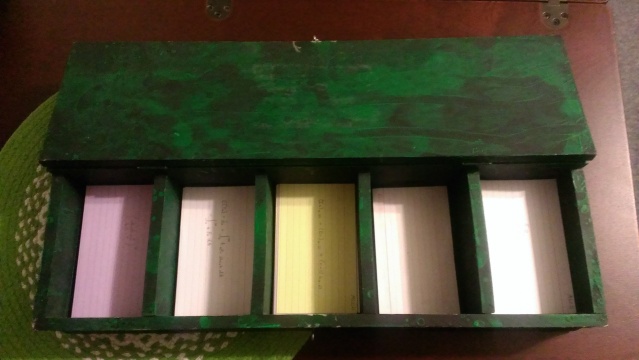
24dpr41

By the time I saw this, I had already been using software, so I found this method hilarious in the sense that this method is impractical once you have a large number of cards, say over 1000, but also ingenious in that someone has managed to apply the technique without the use of a computer.

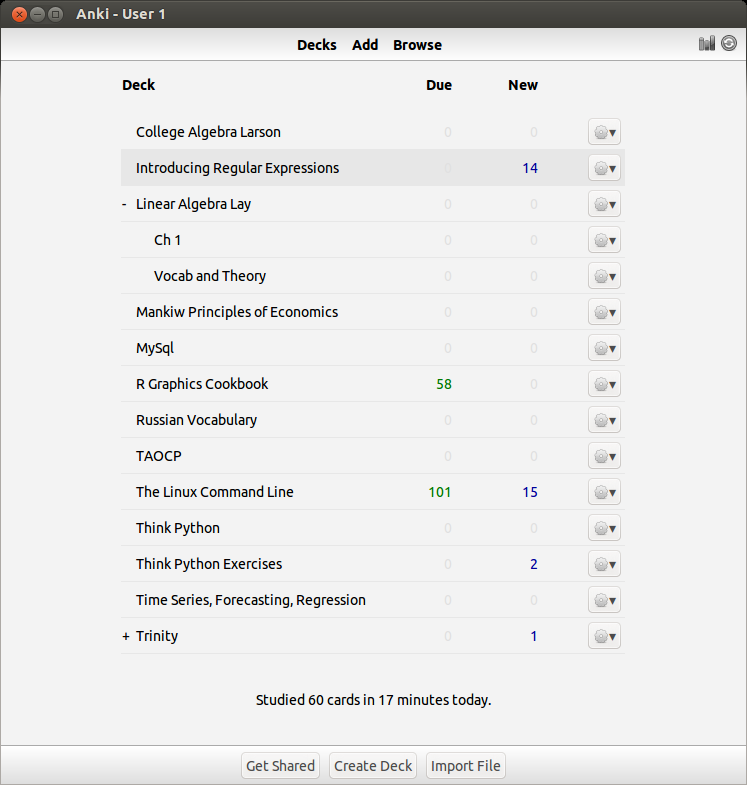
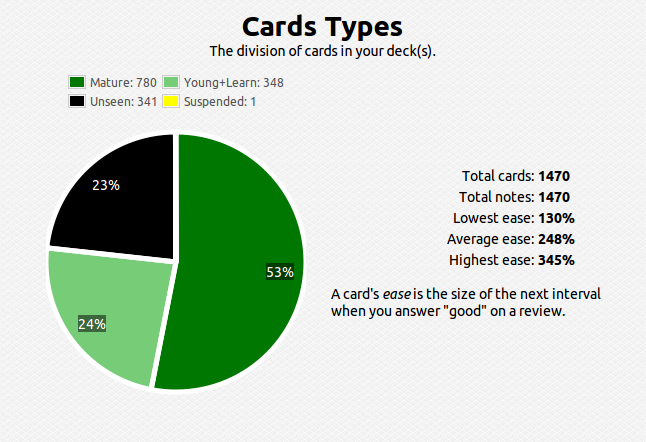
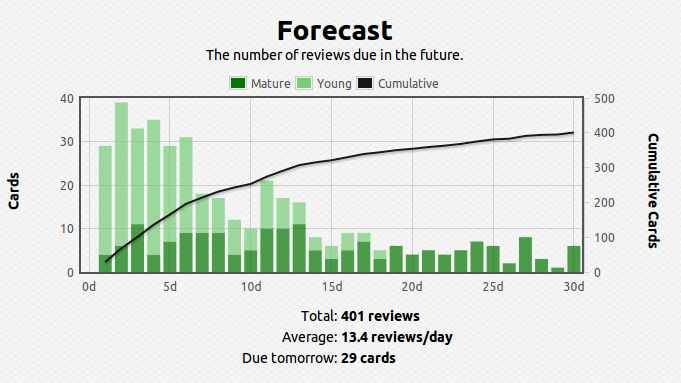
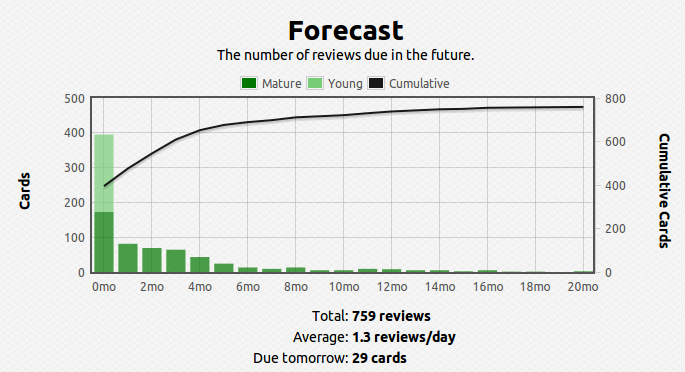
Like I said, once the number of facts becomes large, figuring out the optimal spacing between revisits of material becomes cumbersome and practically impossible to track – this problem also becomes apparent when the gap between revisits becomes large, say, over a year. To solve this problem I use a software called anki, which digitally stores your cards and calculates the time between reviews automatically. Here’s what my current deck looks like so far over the short and long run:
Selection_220


Selection_221


Anki - User 1_223


Selection_222

You can see that I have about 1400 cards covering various subjects. This technique is extremely efficient – you review the material that you are struggling with multiple times and the material you’ve mastered less often. For example, a typical review card would look like this:
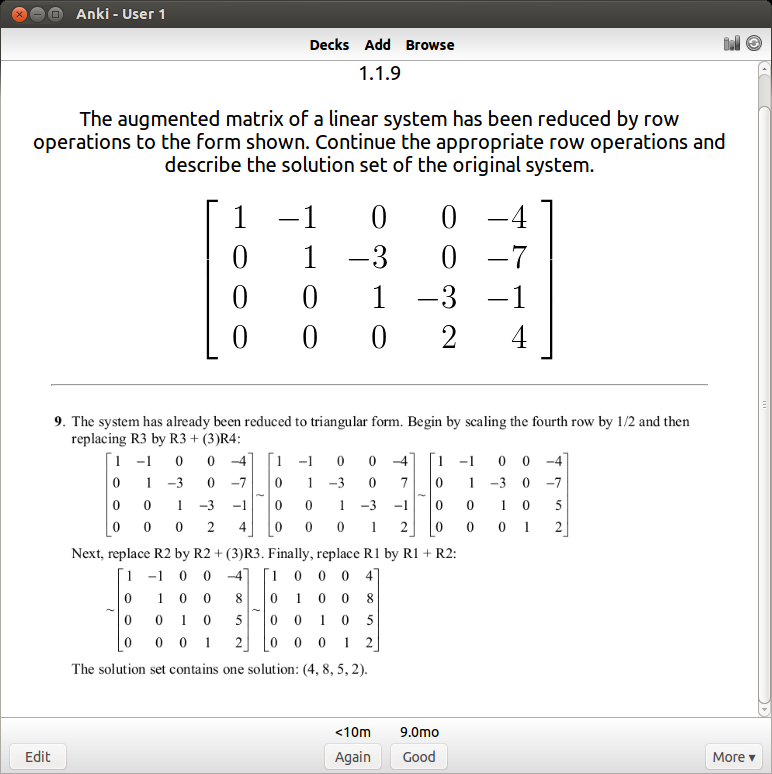
Anki - User 1_224

If I get it right, I won’t see the card again for another 9 months. I’ve actually done this problem several times, so 9 months is an indication that I know it well. If I get it wrong, I have to review it again and the review gap goes back down to zero days. For newer cards, the time until next review will be shorter (4 days).

So, it has taken me quite some time to get to this point – the idea that you can use computers to efficiently commit mathematics to long term memory is incredible. I feel so fortunate to have these tools available to me today. Some technical skills are involved, in particular you need to know LaTeX to get the mathematical notation onto the cards. That itself took a while to learn, but I’m glad I’m finally at the point where I can apply this learning method to mathematics.

There are almost 2,000 problems and 70 sections in David Lay’s linear algebra book, hence, 70 days of linear algebra. I plan to complete all 70 sections problems within 70 days, but that doesn’t mean I will stop doing problems after 70 days, that is just for a first run through the material. Creating a deck of anki cards is actually a very time consuming process, and in that respect I imagine myself only being able to create cards for 2 sections per week. But given that the point of the project is to be able to retain the information over the course of a lifetime, I believe the investment is worth it (I figure if people can use anki to memorize all of Paradise Lost, 2000 problems should be a piece of cake).
Posted in: Mathematics

No. 102: There Will Never be a Perfect Time for Something

17 February, 2014 9:53 PM / Leave a Comment / Gene Dan

I’ve had a hectic last couple months – holiday traveling, family get-togethers, end-of-year projects at work, and so on, and so forth. Despite this, I think I’ve made some big strides in learning the technical skills needed for my upcoming computer projects. In the closing months of 2013, I learned Python. I learned git. I read a 400-page book on how to use the Linux command line. However, every time I felt like I was confident enough to start on a project, I would soon stumble across the latest thing on Hacker News and would have to learn it because it’s the hottest language in the field and every developer will be using it soon.

Haskell you say? Okay, I’ll put in an order for another 350-page book on Amazon. Yes, Haskell, but you need an IDE to edit your code. Alright, that 500-page book on vi and Vim goes into my shopping cart. Okay, no need to worry. It’ll take a while to learn, but this will be the text editor to end all text editors. Then I’ll finally get started on something. But what about Emacs, not everyone uses Vim, maybe you need to learn it to get a better perspective on things. So then another 500-page book goes in the cart. Then I need to learn how to parse text files so yet another book on regular expressions gets added to the cart, then a book on sed, another on grep, and so on, and so forth…

$400 later and enough new books to occupy myself for another 2 years – and I still haven’t gotten past the brainstorming phase on my latest project (to be specific I’m working on some software that will simulate economic markets – but that is a subject for another post). Part of this is a symptom of me not starting programming 10 years ago, but another part of it is that I keep waiting to have the perfect skillset just to start a project. I’ll have to come to grips with myself that my desired state of programming nirvana will never happen.

Every product that reaches the market, and every technology that is developed, will never be perfect. I’m not talking about fatal design flaws that lead to product failure, but imperfection in the sense that human wants and needs will continue to evolve, and under these circumstances, existing products will need to be improved or redesigned to meet the needs of the future. On the other hand, as a designer, you want to be able to anticipate anything that can go wrong with a product. However, the fear of failure can be crippling and in the end, you never get anything done as a result. But it’s not really until you get your product into the hands of other people that you really get to see where improvements can be made, and such feedback is vital to the designer. The key is that you need to make your creation improve the human condition in some way, even if it’s not perfect. As your product, and the ideas and innovations that come along with it – are circulated throughout the population, only then does it allow other people build upon what you’ve done and to create new ideas of their own. Then, life marches on. But if your ideas never get executed, nothing happens, and humanity leaves you behind.


– P.S. –

You may have noticed that I added a github link to the top of the page. There’s not much on it currently, but I did create and give a presentation on dynamic documents at the Houston Visualization Meetup two weeks ago. You can view the presentation materials here. In the meantime, I will be updating the repositories daily.

Posted in: Logs / Tagged: databases, economics, github, RDBMS, relational databases, simulation

No. 101: Visualizing Networks

25 December, 2013 11:06 PM / 4 Comments / Gene Dan

Hello,

Today I’d like to give a brief update on some of the things I’ve been working on over the past few months, and perhaps briefly cover some projects that I’ve planned for myself for the upcoming year.

Networks

A few months back, an actuary contacted me and asked me if I wanted to study network analysis. I had looked into the subject a year ago and even bought some books (Networks by Mark Newman and Networks, Crowds, and Markets by Easley and Kleinberg), but never got around to reading them. Last week, I finally started reading the Easly and Kleinberg text, and right now I’m in the early stages covering basic terminology.

In short, the study of networks is a combination of graph theory and game theory, and is used to study crowd behavior and things like conformity, political instability, epidemics, and market collapse. These things have interested people for some time as they are social phenomena that have, from time to time, led to social upheaval and destruction.

Visualization

Over the past decade, the amount of data that we have on social networks has grown exponentially, and so has computing power. This has now made the empirical analysis of networks, which was once impractically expensive and time-consuming, possible. I’ve initiated a project called hxgrd which will essentially serve as a platform for simulating discrete, turn-based behavior amongst crowds. I’ve only initialized the repository (I’ll talk more about this github project in another post), and I’m looking for some software that I can integrate into the platform to save me some time later on.

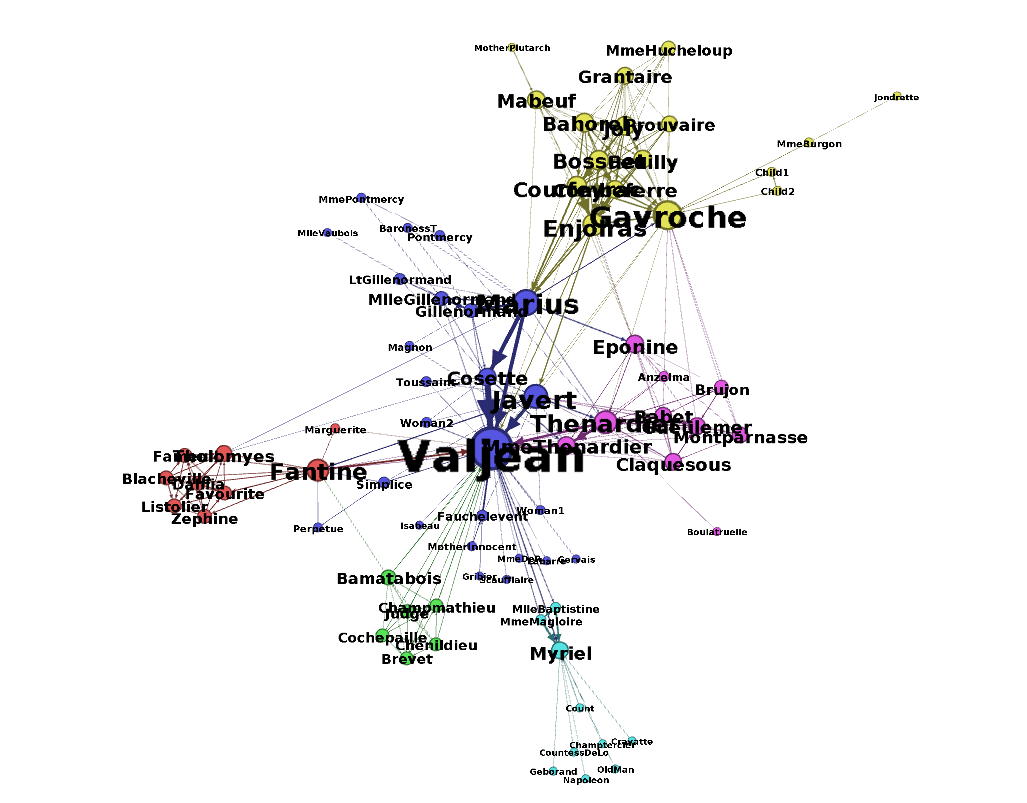
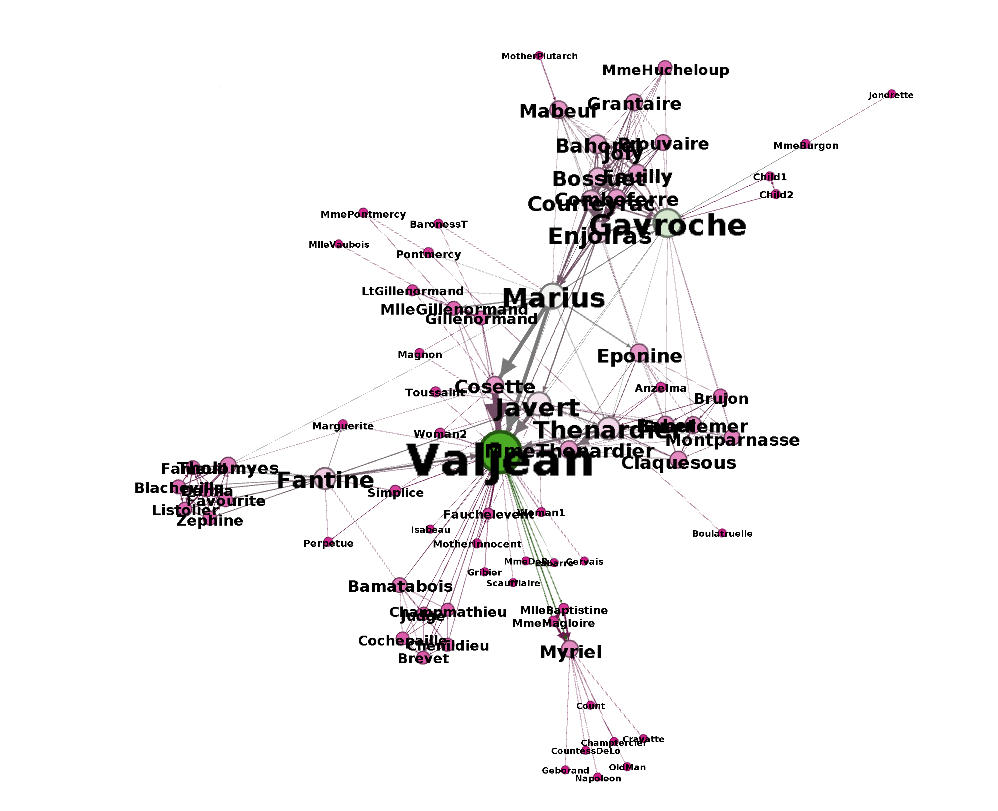
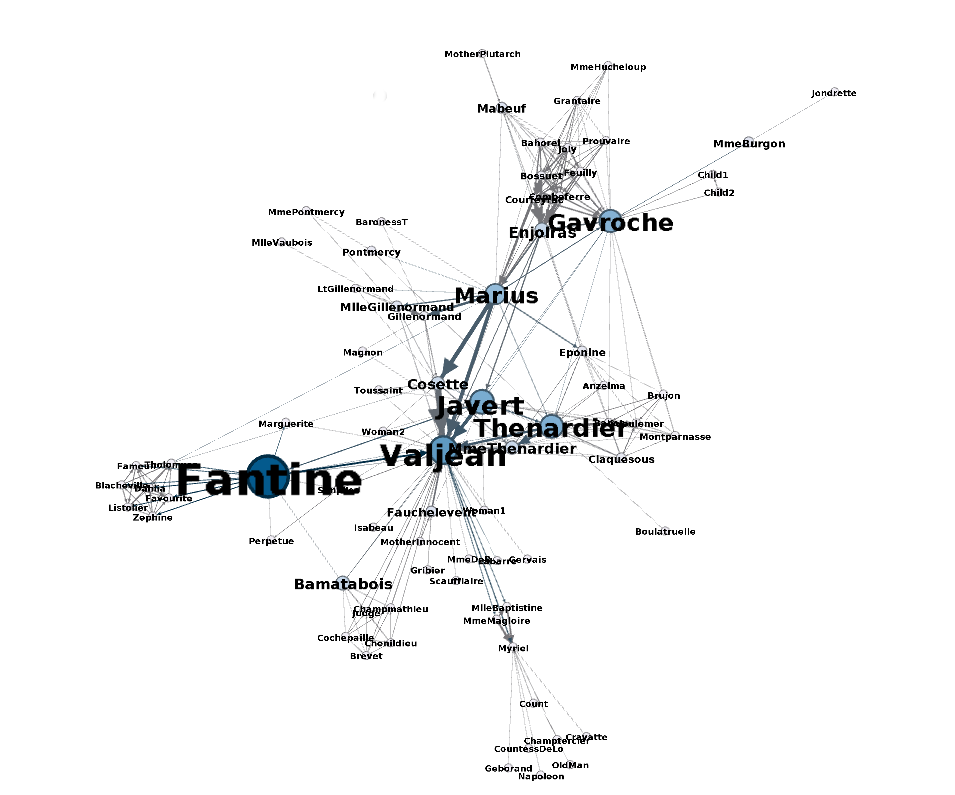
I stumbled accross a software called gephi which is an open-source tool used to visuzlize and analyze networks. I downloaded the program out of curiosity and went through their tutorial, which invovles visualizing the relationships between characters of Les Misérables (perhaps you have read the book or seen the musical). Here is a chart generated by gephi:

Selection_064 (copy)

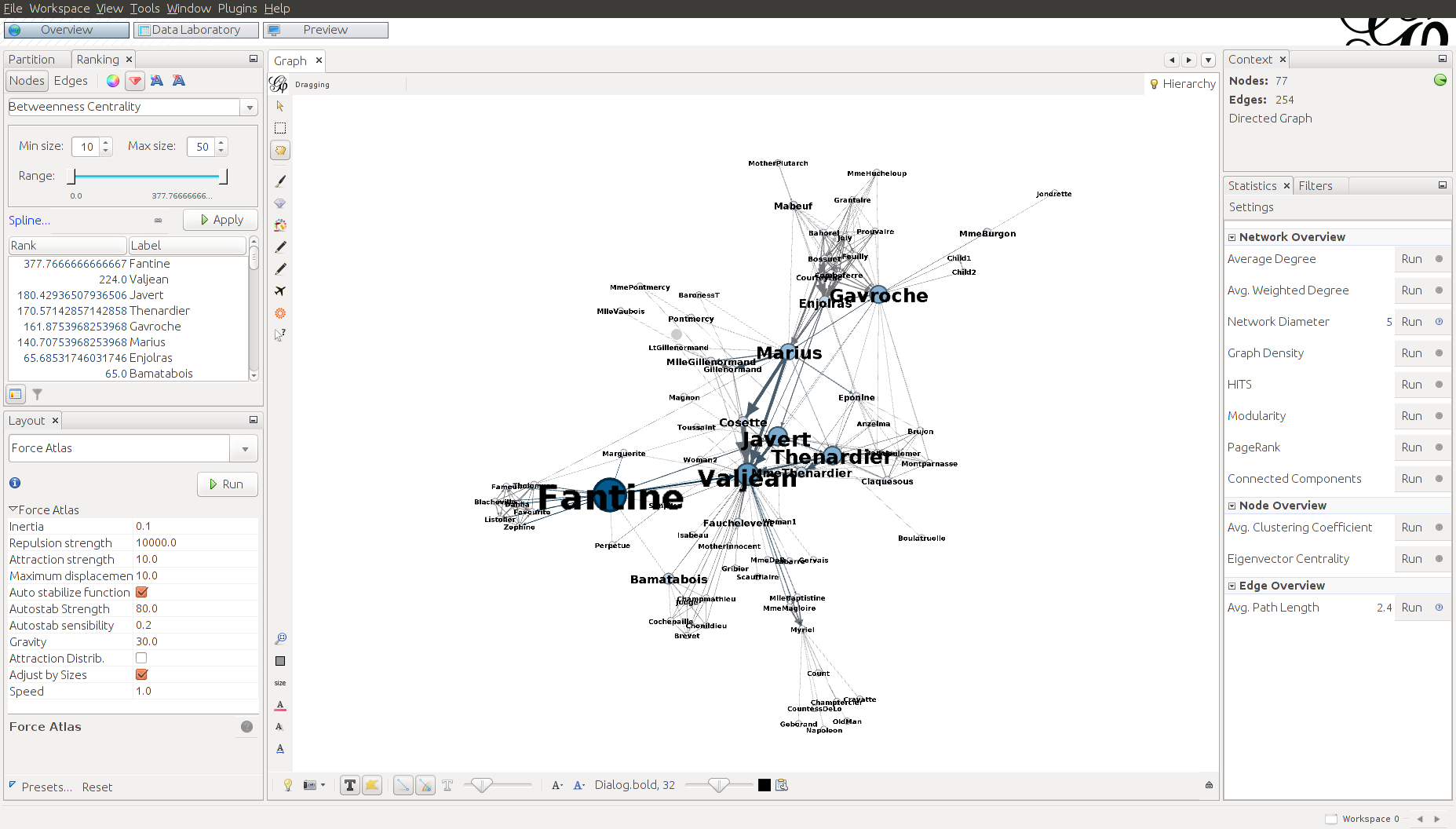
The graph consists of circles, called nodes, and lines connecting these nodes, called edges. Each circle represents a character that appears in the novel. Each line represents an association between characters. The size of the circles and names of the characters vary proportionally with the number of connections that a character has. As you can see here, Jean Valjean, the main character, has the greatest number of connections.

However, just because a character has the most connections doesn’t mean they are the most influential, and an alternative measure, called betweenness centrality, is a measure of a node’s importance. Below, we can see that Fantine has the highest betweenness centrality:

Selection_063 (copy)

Gephi can also determine the groups to which characters belong, denoted by color:

Selection_065

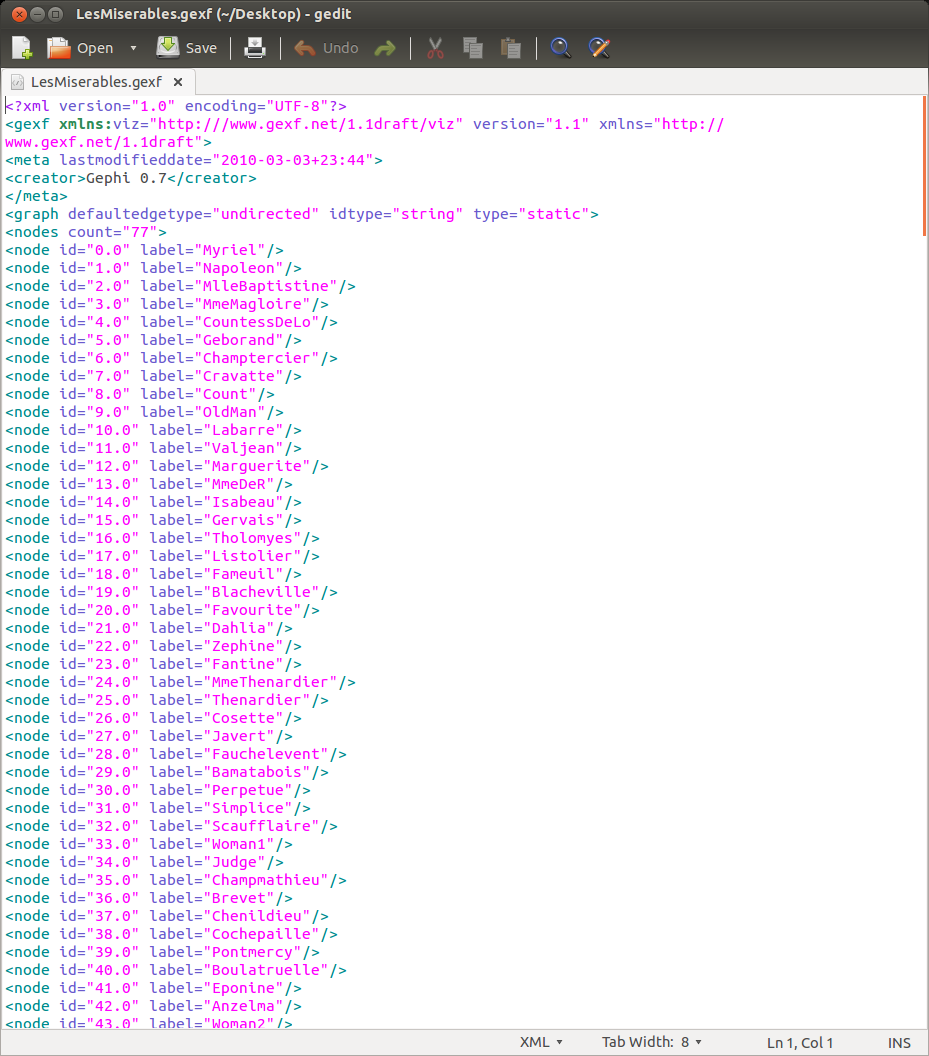
The dataset that was used to generate these diagrams is in XML format:

LesMiserables.gexf (~-Desktop) - gedit_066

And below you can see what the complete GUI looks like:

Gephi 0.8.2 - Project 0_062

Well that’s it for today! I’ll look into the software to understand how it works and to see if I can integrate parts of it into my hxgrd project.

Posted in: Mathematics / Tagged: game theory, gephi, graph theory, les miserables, network analysis

No. 100: Strike Incidents – Visualizing Data with ggplot2

17 October, 2013 7:55 PM / Leave a Comment / Gene Dan

Today, I’d like to demonstrate some of ggplot2‘s plotting capabilities. ggplot2 is a package for R written by Hadley Wickham, who teaches nearby at Rice University. I’ve been using it as my primary tool for visualizing data both at work and in my spare time.

Wildlife Strikes

The Federal Aviation Administration oversees regulations concerning domestic aircraft. One of the interesting things they keep track of are collisions between aircraft and wildlife – the vast majority of which involving birds. This dataset is available for download from the FAA website.

It turns out that bird strikes happen a lot more frequently than I thought. A quick look at the database revealed that 146,607 reported incidents have occured since 1990 (about 11,000 per year), with the number of birds killed ranging anywhere from 1 to over 100 per incident (cases in which an airplane flew through a flock of birds). Although human deaths are infrequent (less than 10 per year), bird strikes cause substantial physical damage at around $400 million per year

ku-bigpic

An example of bird-related damage.

Data Preparation
There are tools available that allow R to communicate with databases via ODBC connectivity. The database concerning strike incidents is in .mdb format which can be accessed with the package RODBC.

The code below loads the package RODBC along with ggplot2 and returns a brief summary of our dataset:

1
2
3
4
library(RODBC)
library(ggplot2)
 
channel

str

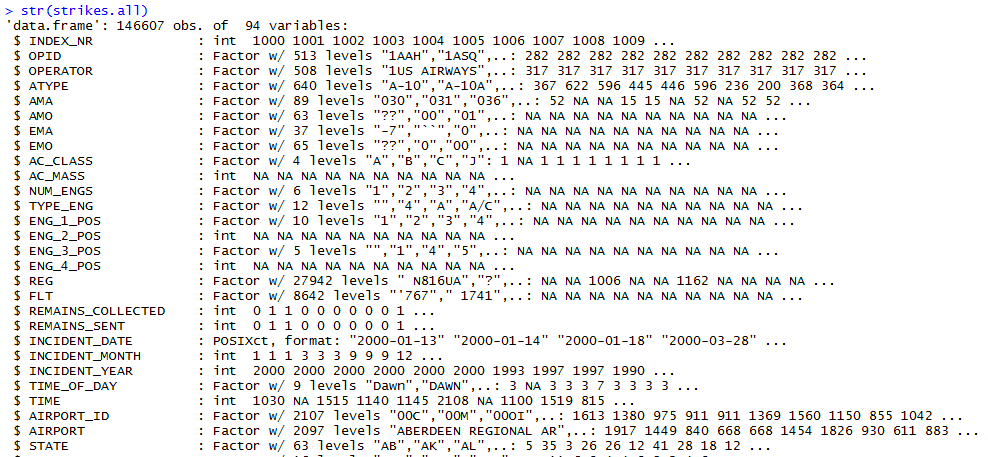
As you can see, data in this form are not easy to interpret. R’s visualization tools allow us to transform this data into something meaningful for our audience.

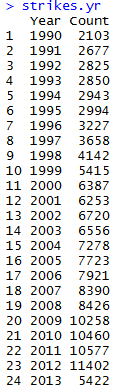
RODBC lets us send SQL queries to the database connection to aggregate and summarize the data. I found MSAccess’ particular SQL implementation to be very awkward, but I was able to alter my code enough to succesfully return the number of incidents by year:

1
2
3
4
5
6
7
8
strikes.yr <- sqlQuery(channel,"SELECT [INCIDENT_YEAR] AS [Year],
                                      COUNT(*) AS [Count]
                                      FROM [StrikeReport]
                                      GROUP BY [INCIDENT_YEAR]
                                      ORDER BY [INCIDENT_YEAR]")
 
strikes.yr <- aggregate(Count~Year,FUN=sum,data=strikes)
strikes.yr

stryr

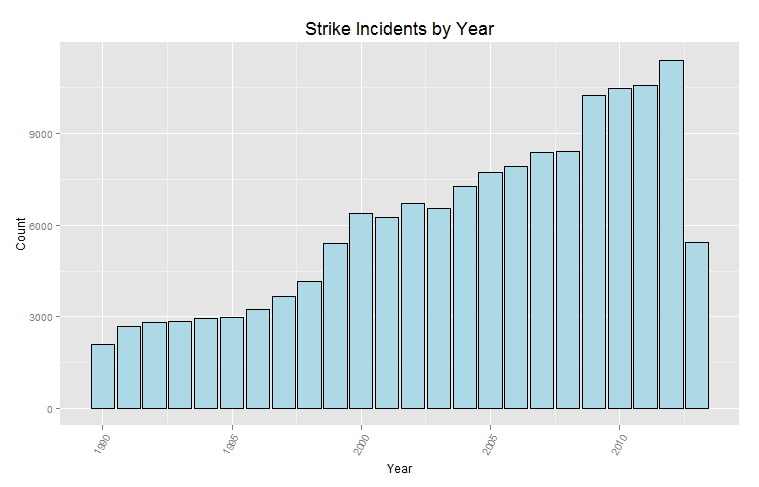
Next, we use the function ggplot from ggplot2 to create a bar plot of our data:

1
2
3
4
ggplot(strikes.yr,aes(x=Year,y=Count))+
  geom_bar(stat="identity",fill="lightblue",colour="black")+
  theme(axis.text.x = element_text(angle=60, hjust=1,size=rel(1)))+
  ggtitle("Strike Incidents by Year")+theme(plot.title=element_text(size=rel(1.5),vjust=.9))

strike_yr

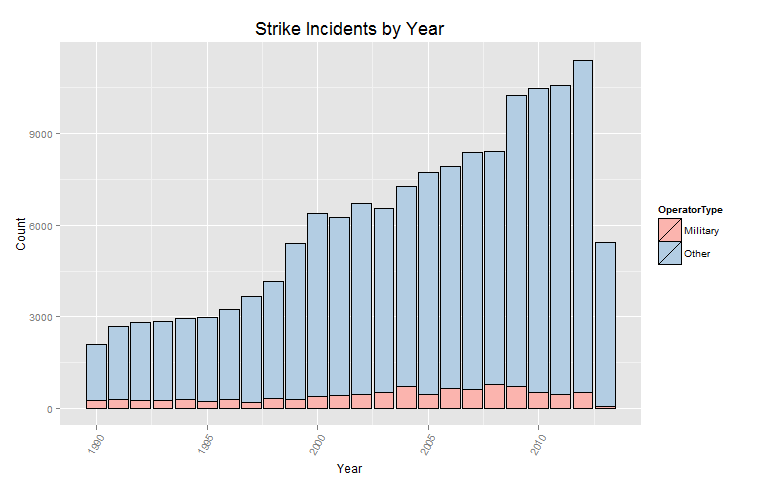
From the diagram above, we can see that the number of strikes has increased substantially over the last 24 years. However, we can’t make any definite conclusions without more information. Perhaps this increase is due to more aircraft being flown for longer durations. Or maybe it’s due to better/more accurate reporting of incidents. Notice that the bar for 2013 is much lower than the previous year. The most straightforward explanation for this observation is that 2013 isn’t over yet, and not all the incidents that have happened have been reported yet.

We can use ggplot2 to see the proportion of strikes that have been incurred by the military. The fill argument specifies that the bars should be segmented by operator type:

1
2
3
4
5
ggplot(strikes,aes(x=Year,y=Count,fill=OperatorType))+
  geom_bar(stat="identity",colour="black")+
  scale_fill_brewer(palette="Pastel1")+
  theme(axis.text.x = element_text(angle=60, hjust=1,size=rel(1)))+
  ggtitle("Strike Incidents by Year")+theme(plot.title=element_text(size=rel(1.5),vjust=.9))

strike_militry

Now, let’s take a look at which aircraft operators have experienced the most accidents over the last 24 years. The code below sends a query to the database connection that summarizes the incidents by operator:

1
2
3
4
5
6
7
8
9
strikes.oper <- sqlQuery(channel,"SELECT [OPERATOR] AS [Name],
                                      COUNT(*) AS [Count]
                                      FROM [StrikeReport]
                                      GROUP BY [OPERATOR]
                                      ORDER BY COUNT(*) DESC")
 
opr.order <- strikes.oper$Name[order(strikes.oper$Count)]
strikes.oper$Name <- factor(strikes.oper$Name,levels=opr.order)
strikes.oper

oper

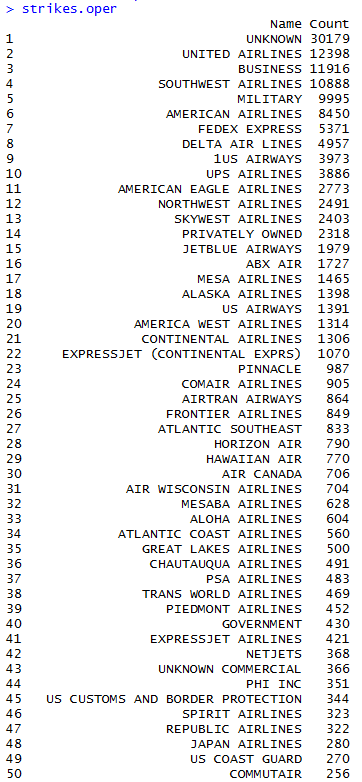
In this case, the data were not ordered upon extraction, so the two lines after the SQL query reorder the strikes.oper vector by strike count.

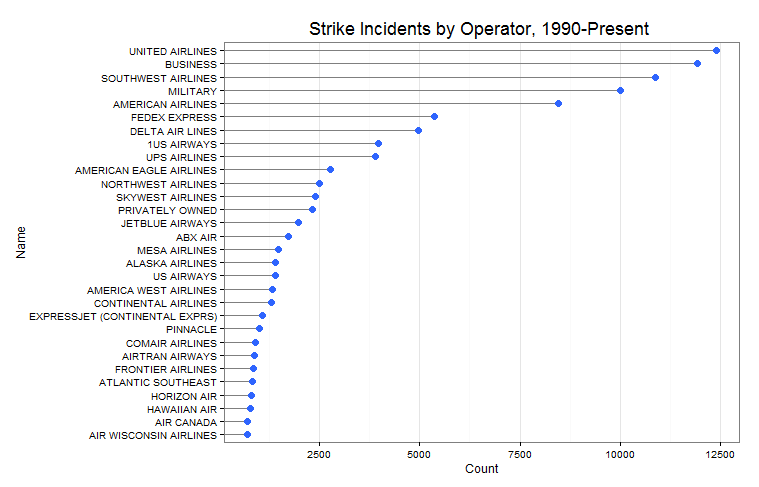
We can now use this data to visualize the top 30 operators with a dot plot:

1
2
3
4
5
ggplot(strikes.oper[2:31,],aes(x=Count,y=Name))+geom_segment(aes(yend=Name), xend=0, colour="grey50") +
  geom_point(size=3.5,colour="#2E64FE")+
  theme_bw() +
  theme(panel.grid.major.y = element_blank())+
  ggtitle("Strike Incidents by Operator, 1990-Present ")+theme(plot.title=element_text(size=rel(1.5),vjust=.9))

strike_oper

It turns out United Airlines happens to have the most incidents, followed by an ambiguous class called “Business” (perhaps private aircraft), the military, and Southwest Airlines. Keep in mind that this says nothing about the frequency of such incidents, only the magnitude. We’ll need more data in order to make inferences about things like safety. It could be the case that United and Southwest are relatively safe airlines, but only have many incidents because they fly the most hours.

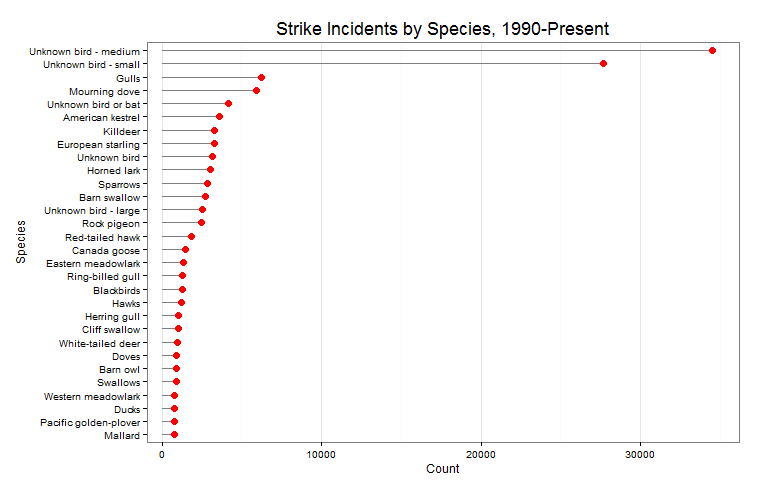
So, which animals happen to have the most strike incidents? The code below summaries the data and plots it in a dot plot:

1
2
3
4
5
6
7
8
9
10
11
12
13
14
strikes.spec <- sqlQuery(channel,"SELECT [Species],
                                      COUNT(*) AS [Count]
                                      FROM [StrikeReport]
                                      GROUP BY [SPECIES]
                                      ORDER BY COUNT(*) DESC")
 
spec.order <- strikes.spec$Species[order(strikes.spec$Count)]
strikes.spec$Species <- factor(strikes.spec$Species,levels=spec.order)
 
ggplot(strikes.spec[1:30,],aes(x=Count,y=Species))+geom_segment(aes(yend=Species), xend=0, colour="grey50") +
  geom_point(size=3.5,colour="#FF0000")+
  theme_bw() +
  theme(panel.grid.major.y = element_blank())+
  ggtitle("Strike Incidents by Species, 1990-Present")+theme(plot.title=element_text(size=rel(1.5),vjust=.9))

strike_spec

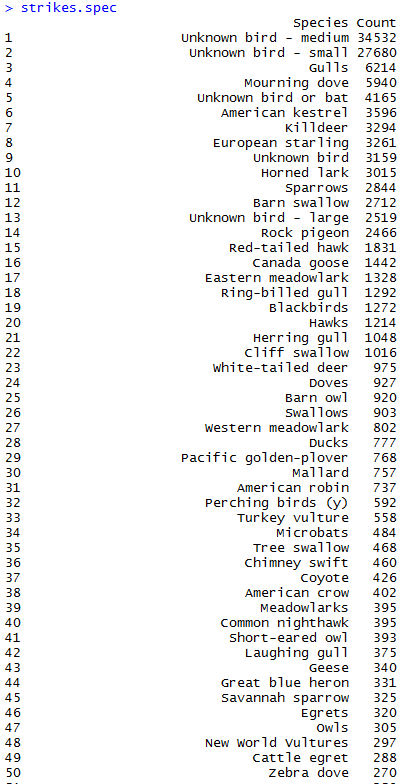
Most of the time, the type of animal is unidentifiable (go figure), but when it is the most likely case is that it’s a gull or a mourning dove. There are many more species in the database than are depicted in the chart above, which only has the top 30. Below is a partial list of species:

spec

Interestingly, I saw some land animals in the dataset, such as elk, caribou, and aligators (not shown above, but you can see coyotes).

Posted in: Logs, Mathematics / Tagged: bird strike, bird strike R, bird strike statistics, FAA strike wildlife strike database, ggplot2, visualizing data, wildlife strike statistics

No. 99: Eratosthenes’ Sieve

26 August, 2013 8:29 PM / Leave a Comment / Gene Dan

A friend of mine pointed out that I had skipped a few steps in the solution I posted yesterday for Euler #3 – first, I didn’t actually go through the process of finding the primes, and second, I didn’t try to figure out how many prime numbers would be necessary for the list I used to find the largest prime factor of 600,851,475,143. To rectify these issues, I wrote another program that can provide the general solution for any integer larger than 1:

1
2
3
4
5
6
7
8
9
10
11
12
13
prime <- 2
primes <-c()
remaining.factor <- 600851475143
while(prime != remaining.factor){
  while(remaining.factor %% prime ==0){
    remaining.factor <- remaining.factor/prime
  }
  primes <- append(primes,prime)
  while(length(which(prime %% primes ==0)>0)){
    prime <- prime + 1
  }
}
remaining.factor

All you have to do is replace 600,851,475,143 with a number of your choice, and the script above will find the largest prime factor for that number, given enough time and memory. I was actually somewhat lucky that the answer ended up being 6857. Had it been larger, the program might have taken much longer to execute (possibly impractically long if the factor happened to be big enough).

Eratosthenes’ Sieve

Now that I have that out of the way, I would like to demonstrate a method for quickly generating prime numbers, called Eratosthenes’ Sieve. You can embed this algorithm into the solution of any Project Euler problem that calls for a large list of prime numbers under 10 million (after 10 million, the algorithm takes a long time to execute, and other sieves may be a better choice). While it’s possible to generate prime numbers on the fly for Euler problems, I still prefer to use lists to solve them. Below is the algorithm for Eratosthenes’ Sieve that I’ve written in R:

1
2
3
4
5
6
7
8
9
primes <- 2:10000000
 
curr.prime <- 2
while(curr.prime < sqrt(10000000)){
  primes[(primes >= curr.prime **2) & (primes %% curr.prime == 0)] <- 0
  curr.prime <- min(primes[primes>curr.prime])
}
 
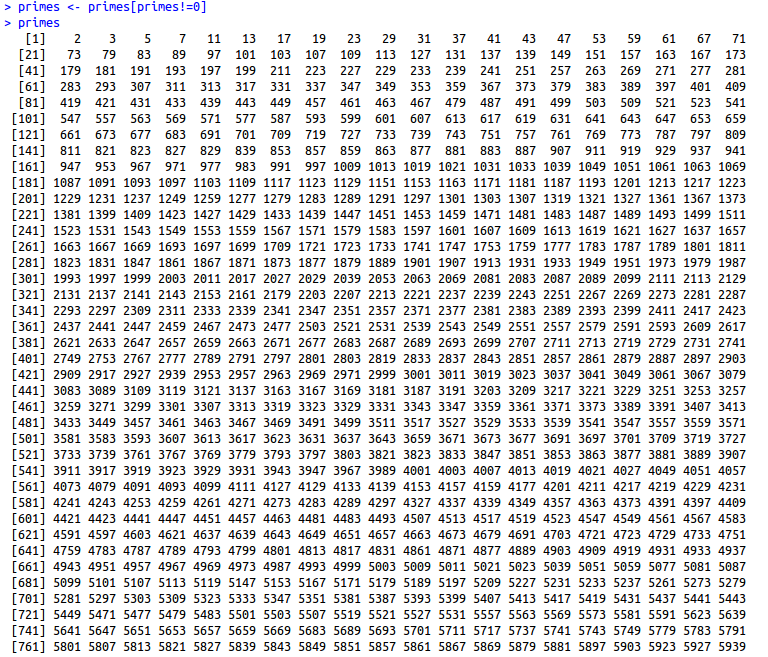
primes <- primes[primes!=0]

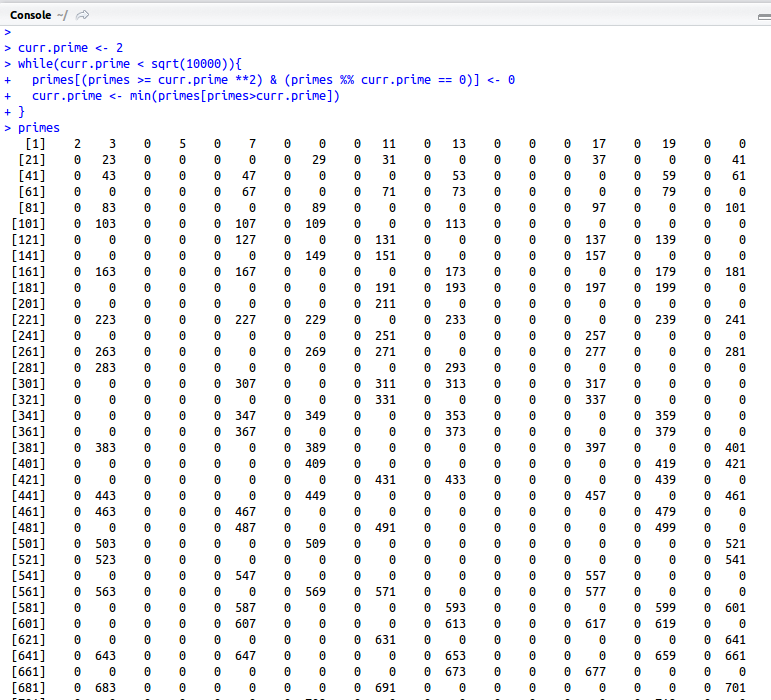
The script above will generate a list of all the primes below 10,000,000. The algorithm starts with a list of integers from 2 to 10,000,000. Starting with 2, the smallest prime, you remove all the multiples of 2 from the list. Then you move on to the next prime, 3, and remove all the multiples of 3 from the list. The process continues until the only numbers left in the list are prime numbers.

primes2

As you can see, all the composite numbers are now marked as zeros. The final line of the script removes these zeros and gives you a list of just the prime numbers.

primes3

Posted in: Mathematics / Tagged: eratosthenes sieve, eratosthenes sieve in r, project euler 3, project euler 3 r, R

Post Navigation

« Previous 1 … 9 10 11 12 13 … 30 Next »

Archives

  • August 2025
  • July 2025
  • September 2023
  • February 2023
  • January 2023
  • October 2022
  • March 2022
  • February 2022
  • December 2021
  • July 2020
  • June 2020
  • May 2020
  • May 2019
  • April 2019
  • November 2018
  • September 2018
  • August 2018
  • December 2017
  • July 2017
  • March 2017
  • November 2016
  • December 2014
  • November 2014
  • October 2014
  • August 2014
  • July 2014
  • June 2014
  • February 2014
  • December 2013
  • October 2013
  • August 2013
  • July 2013
  • June 2013
  • March 2013
  • January 2013
  • November 2012
  • October 2012
  • September 2012
  • August 2012
  • July 2012
  • June 2012
  • May 2012
  • April 2012
  • March 2012
  • February 2012
  • January 2012
  • December 2011
  • September 2011
  • August 2011
  • July 2011
  • June 2011
  • January 2011
  • December 2010
  • October 2010
  • September 2010
  • August 2010
  • June 2010
  • May 2010
  • April 2010
  • March 2010
  • September 2009
  • August 2009
  • May 2009
  • December 2008

Categories

  • Actuarial
  • Cycling
  • FASLR
  • Logs
  • Mathematics
  • MIES
  • Music
  • Uncategorized

Links

Cyclingnews
Jason Lee
Knitted Together
Megan Turley
Shama Cycles
Shama Cycles Blog
South Central Collegiate Cycling Conference
Texas Bicycle Racing Association
Texbiker.net
Tiffany Chan
USA Cycling
VeloNews

Texas Cycling

Cameron Lindsay
Jacob Dodson
Ken Day
Texas Cycling
Texas Cycling Blog
Whitney Schultz
© Copyright 2026 - Gene Dan's Blog
Infinity Theme by DesignCoral / WordPress