• Home
  • Readings
  • Github
  • MIES
  • TmVal
  • About
Gene Dan's Blog

No. 78: Project Euler #1

30 November, 2012 3:45 AM / 1 Comment / Gene Dan

Hey everyone,

I took a few weeks off posting in order to study for Exam MFE, which I took 4 weeks ago. I’m still waiting for the result, so in the meantime I’ve decided to knock out the CAS modules and finish up my SQL course before I have to start studying hard again. Anyway, I’ve finally gotten around to attempting the Project Euler problems that my friends, along with other actuaries, recommended to me as a good way to improve my programming skills.

Basically, Project Euler is a website that hosts mathematical problems that anyone can attempt to solve with whatever method they wish. Most of the problems are simply stated and can be understood by most people who have taken a basic course in number theory. However, they are often very computationally intensive if attempted directly so most people try to solve them by writing computer programs. Oftentimes students will use the site in an iterative fashion to practice their programming skills when picking up a new language. For example, one of my colleagues who has solved 80 problems first used the site to learn VBA, and then did the same problems again in R, and then again in C++.

For my first attempt, I decided to use VBA because I already know most of the basic syntax. Before starting, I decided that I would not seek any outside help or lookup any solutions when trying to solve these problems, because I want to work these out on my own. So please don’t give me any tips! (although I do appreciate any advice for any of my other projects).

The first problem is stated as follows:

If we list all the natural numbers below 10 that are multiples of 3 or 5, we get 3, 5, 6 and 9. The sum of these multiples is 23.

Find the sum of all the multiples of 3 or 5 below 1000.

Solution:

[code language=”vb”]
Sub euler1()

Dim x As Long ‘natural number to be tested
Dim y As Long ‘current sum of the multiples of 5 or 3

y = 0
For x = 1 To 999
If x Mod 3 = 0 Or x Mod 5 = 0 Then
y = y + x
End If
Next x

Debug.Print y

End Sub
[/code]

The final output is 233168. As you can see, the problem is quite easy to understand (and this one was very easy to solve as well) for anyone who passed grade school math. You can probably solve it by sitting at your desk and adding every multiple of 3 or 5 below 1000 by hand, but that would be extremely boring and you probably have better things to do. That’s why you write a program to solve the problem. The solution I wrote above is a simple brute force method (I tested every natural number below 1000 to see if it was evenly divided by 3 or 5) that took less than a second for my computer to solve. The key to understanding the solution is the mod operator, which returns the remainder in a division operation (for example 5 mod 3 equals 2). The statement “If x Mod 3 = 0 Or x Mod 5 = 0” tells the computer to execute the subsequent line, or to add x to the cumulative sum if either x mod 3 or x mod 5 equals 0, in other words, if the remainder after dividing x by 3 or 5 is 0.

So far I’ve solved 17 of the problems, mostly through brute force although I was able to solve one of them by hand. However, as the problems get progressively harder and more computationally intensive, brute force methods become less feasible and more creative thought is required. For example, problem 12 took my computer at least an hour to solve (I’m not sure how long it actually took because I left it on after I went to sleep). This means my solution wasn’t efficient, and that I ought to give it another shot (reduce the amount of iterative code, perhaps).
Posted in: Logs, Mathematics / Tagged: project euler, project euler #1, project euler vba, VBA

No. 77: Stochastic Calculus on a Friday Night

13 October, 2012 2:21 AM / Leave a Comment / Gene Dan

\[\int^a_b \mathrm{d}Z(t) = \lim_{n \to \infty} \sum^n_{i=1}\left(Z\left(\frac{ia}{n}\right)-Z\left(\frac{(i-1)a}{n}\right)\right) \]
Hey everyone,

I’m struggling to absorb all the material necessary to pass MFE, but if I can just plow through the 3 remaining chapters I think I’ll be OK. I keep telling myself not to freak out because everyone else says that the last quarter of MFE is notoriously difficult. You’re not expected to master the theoretical details of Brownian motion or Itô processes but you are expected to be able to understand the basics and be able to manipulate mathematical expressions to make meaningful calculations – such as pricing bonds and options – but even that can be intimidating, especially to those (like me) who haven’t taken a course on differential equations.

The figure above represents a stochastic integral – this is kind of like the type of integral you learned in elementary calculus except in this case the function Z(t) is not a fixed function – it is a function that returns a random value from a normal distribution whose parameters vary with respect to time. This particular integral calculates the movement of a stock price from time b to time a. Another thing we might want to model is the total variation of the process – which is the arc length of the stock price trajectory (we use the absolute value because we want down-moves, which are negative, to add to the arc length) :
\[ \lim_{n to \infty}\sum^n_{i=1}\left|X\left(\frac{iT}{n}\right)-X\left(\frac{(i-1)T}{n}\right)\right| \]
An interesting note is that as n approaches infinity, the probability the trajectory crosses its starting point an infinite number of times equals 1 (I have a hard time imagining this).

The image below is a visual representation of Brownian motion with different shades of blue representing a different number of steps. Note that this wouldn’t be appropriate for stock prices because ideally, we would want the trajectory to only traverse positive time and value:

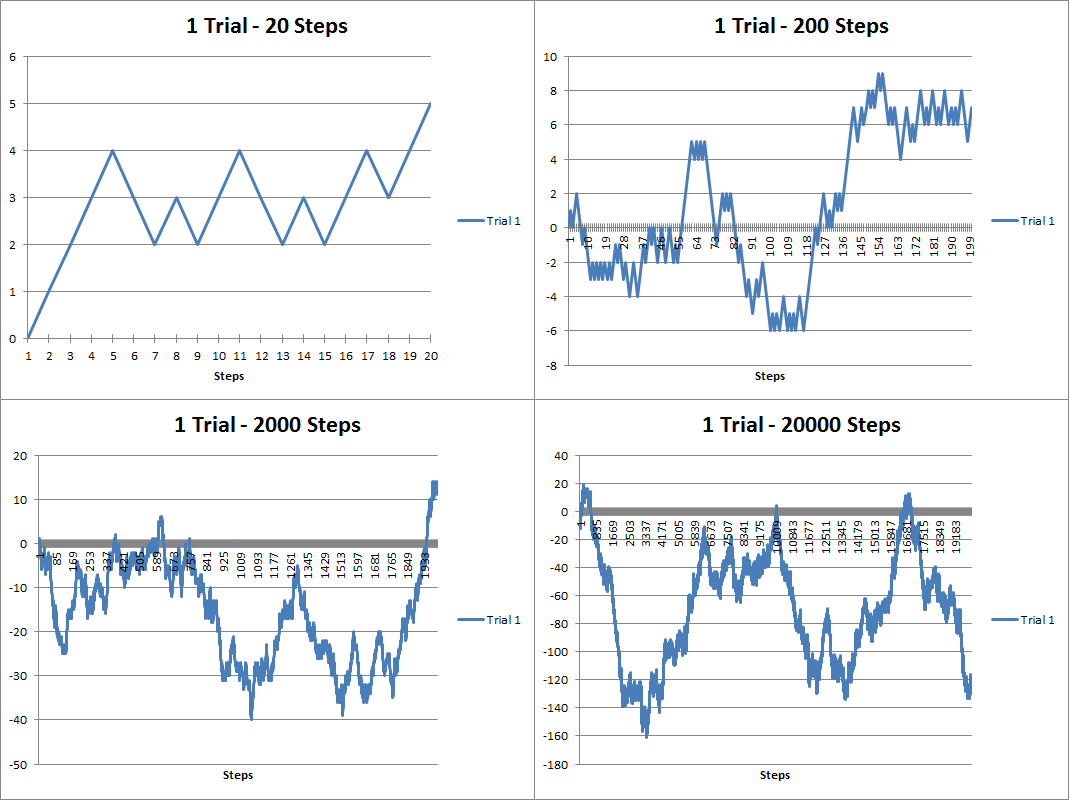
Anyway, over a year ago I dabbled with some discrete stochastic processes using VBA. Here are some random walks I generated:

The above figure are random walks generated using 20, 200, 2000 and 20000 steps. You can see that it looks kind of like a stock chart except the values can be negative. As the number of steps increases, the trajectory looks more like a curve. Brownian motion is when the number of steps becomes infinitely large and the time between steps infinitely small. Below you’ll see that I’ve overlapped several trials below. As the number of trials increases, you can see that the results take up more and more of the possible trajectory space:

About a year and a half ago I had created a youtube video showing how you can animate the random walks in VBA:

Here’s part of the source code I used to generate the walks:

[code language=”vb” wraplines=”TRUE” collapse=”TRUE”]

Sub randwalk()

Dim x As Double
Dim y As Long, z As Double, m As Integer, n As Integer, s As Integer
Dim randarray() As Double
Dim ymax As Integer
Dim ChtObj As ChartObject
Dim Steps As Double, Trials As Double
Dim stup As Double, stdown As Double
Dim pstup As Double, pstown As Double
Dim frate As Double

starttime = Timer

Application.ScreenUpdating = False

For Each ChtObj In Worksheets(“Graph”).ChartObjects
ChtObj.Delete
Next ChtObj

Worksheets(“Data”).UsedRange.Clear

Steps = Range(“STEPS”).Value
Trials = Range(“TRIALS”).Value
stup = Range(“STUP”).Value
stdown = Range(“STDOWN”).Value
pstup = Range(“PSTUP”).Value
frate = Range(“FRATE”).Value

ReDim randarray(0 To Steps) As Double

For m = 0 To Trials – 1
z = Range(“STARTVAL”).Value
randarray(0) = Range(“STARTVAL”).Value
For y = 1 To Steps
x = Rnd()
If x >= (1 – pstup) Then x = stup Else x = -1 * stdown
If Range(“FTYPE”).Value = “Arithmetic” Then
z = z + x
Else
z = z * (1 + x)
End If
randarray(y) = z
Next y
Worksheets(“Data”).Range(“A1”).Offset(0, m).Value = “Trial ” & m + 1
Worksheets(“Data”).Range(“A2:A” & Steps + 1).Offset(0, m) = WorksheetFunction.Transpose(randarray)
Next m

If Range(“COMP”).Value = “Yes” Then
For n = 1 To Steps
randarray(n) = randarray(n – 1) * (1 + frate)
Next n

Worksheets(“Data”).Range(“A1:A” & Steps + 1).Offset(0, Trials) = WorksheetFunction.Transpose(randarray)
End If

Dim MyChart As Chart
Dim DataRange As Range
Set DataRange = Worksheets(“Data”).UsedRange
Set MyChart = Worksheets(“Graph”).Shapes.AddChart.Chart
MyChart.SetSourceData Source:=DataRange
MyChart.ChartType = xlLine

With Worksheets(“Graph”).ChartObjects(1)
.Left = 1
.Top = 1
.Width = 400
.Height = 300
.Chart.HasTitle = True
If Trials = 1 Then
.Chart.ChartTitle.Text = Trials & ” Trial – ” & Range(“FTYPE”).Value & ” Progression”
Else
.Chart.ChartTitle.Text = Trials & ” Trials – ” & Range(“FTYPE”).Value & ” Progression”
End If
.Chart.PlotBy = xlColumns

End With

With MyChart.Axes(xlCategory)
.MajorTickMark = xlTickMarkCross
.AxisBetweenCategories = False
.HasTitle = True
.AxisTitle.Text = “Steps”
End With

For s = 1 To Trials
MyChart.SeriesCollection(s).Name = “Trial ” & s
Next s

If Range(“COMP”).Value = “Yes” Then
MyChart.SeriesCollection(Trials + 1).Name = “Fixed Growth”
MyChart.SeriesCollection(Trials + 1).Interior.Color = “black”
End If

Range(“MAXVAL”).Value = WorksheetFunction.Max(Worksheets(“Data”).UsedRange)
Range(“MINVAL”).Value = WorksheetFunction.Min(Worksheets(“Data”).UsedRange)
Range(“EXECTIME”).Value = Format(Timer – starttime, “00.000”)

Application.ScreenUpdating = True

End Sub
[/code]

Posted in: Logs / Tagged: Actuarial Exams, brownian motion, exam MFE, random walks, stochastic calculus, stochastic processes, VBA

No. 76: Exploring Financial Data with Quantmod

6 October, 2012 1:36 AM / 1 Comment / Gene Dan

Hey everyone,

Things have been extremely busy lately – I feel like the quality of my posts will suffer but I’ll try to put anything I find interesting here. I’m currently studying for my fifth actuarial exam – 3F/MFE – which covers models for financial economics. The exam covers the latter half of McDonald’s Derivatives Markets, which is a graduate textbook covering the basics of financial derivatives – such as forwards and options, and introduces the reader to elementary stochastic processes like random walks and Brownian Motion used to theoretically price these derivatives.

Anyway, some snooping around on the internet for open-source financial software led me to some quantitative finance packages in R – namely Quantmod, which I’ll be discussing here. Unfortunately it seems that (correct me if I’m wrong) the Quantmod project has been abandoned for some time, but its ease of use was my reason to showcase it here. It looks like other packages such as Quantlib have more active involvement – but I currently lack the technical skills/financial knowledge  to work with that, but I may revisit it later.

The example above may be a familiar image to some of you – it is a chart depicting the CBOE VIX (volatility index), which measures the implied volatility of S&P 500 index options – in other words – it is an estimate of the short-term volatility of the stock market. Notice that 2008 saw high volatility – this makes sense because the stock market plunged that year. This actually isn’t the highest value seen in the index – to my knowledge that occured on Black Monday in 1987 when the DJIA lost a quarter of its value in less than a day. The above chart was generated using Quantmod with the following code:

[sourcecode language=”r”]
library("quantmod")
getSymbols("^VIX",src="yahoo")
barChart(VIX)
[/sourcecode]

Well, that was simple. Quantmod has a function called getSymbols() that extracts the desired data. The two arguments above (there are more arguments than that – I chose to use the defaults for the rest), specify the ticker symbol to extract (^VIX) and the source of the financial data (yahoo.com). The next function, barchart, plots the data.

1
2
3
4
5
6
7
8
9
10
11
12
13
<span style="color:#0000ff;">&gt;str(VIX)</span>
An ‘xts’ object from 2007-01-03 to 2012-10-05 containing:
  Data: num [1:1453, 1:6] 12.2 12.4 11.8 12.5 11.9 ...
- attr(*, "dimnames")=List of 2
  ..$ : NULL
  ..$ : chr [1:6] "VIX.Open" "VIX.High" "VIX.Low" "VIX.Close" ...
  Indexed by objects of class: [Date] TZ:
  xts Attributes:  
List of 4
$ tclass : chr [1:2] "POSIXct" "POSIXt"
$ tzone  : chr ""
$ src    : chr "yahoo"
$ updated: POSIXct[1:1], format: "2012-10-05 20:02:43"

The output above tells us that the variable VIX is a time-series object (xts) from January 1st, 2003 to today. The following is the output of the first 10 rows of daily data:

1
2
3
4
5
6
7
8
9
10
11
12
13
&gt;VIX[1:10]
<span style="color:#000000;">           VIX.Open VIX.High VIX.Low VIX.Close VIX.Volume VIX.Adjusted
2007-01-03    12.16    12.75   11.53     12.04          0        12.04
2007-01-04    12.40    12.42   11.28     11.51          0        11.51
2007-01-05    11.84    12.25   11.68     12.14          0        12.14
2007-01-08    12.48    12.83   11.78     12.00          0        12.00
2007-01-09    11.86    12.47   11.69     11.91          0        11.91
2007-01-10    12.34    12.50   11.43     11.47          0        11.47
2007-01-11    11.42    11.48   10.50     10.87          0        10.87
2007-01-12    10.93    10.93   10.14     10.15          0        10.15
2007-01-16    10.64    10.89   10.40     10.74          0        10.74
2007-01-17    10.90    10.90   10.35     10.59          0        10.59
</span>

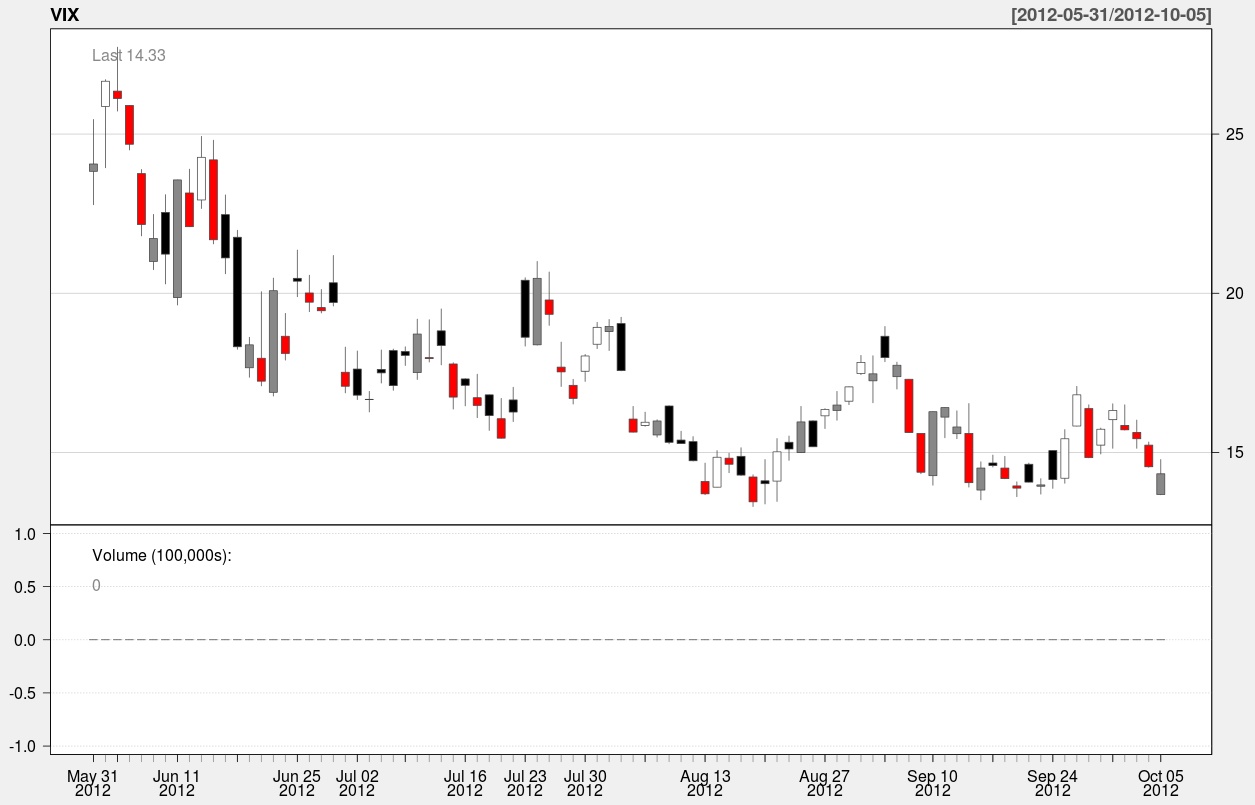
Here’s an example of a candle chart covering the last 90 days of the index:

A candle chart allows you to visualize the daily spread in addition to the trend over a longer period of time. In the above chart, the colored rectangles are bounded by the open/close values of the day, and the endpoints of the vertical line segments represent the hi/low values of the day.

The function used to generate this chart is:

[sourcecode language=”r”]
candleChart(VIX,multi.col=TRUE,theme="white",subset="last 90 days")
[/sourcecode]

The argument “subset” specifies the slice of time to be plotted in the chart. It’s nice because it accepts natural language – all I had to do was type in “last 90 days” to specify the time interval. Anyway that’s it for now – In the meantime I’ll be spending up to 4-5 hours a day preparing for my test at the beginning of next month.

Posted in: Logs, Mathematics

No. 75: A Training Update

11 September, 2012 1:30 AM / 1 Comment / Gene Dan

Hey everyone,

I feel like my training has progressed well over the last couple of months. Two weeks ago, I wrote that I would try to increase the time at which I could maintain 160-165 bpm to 60 minutes (2 x 30 minute intervals). I managed to complete this goal last Thursday without too much difficulty, though I was getting tired during the last 10 minutes of the second interval:

You can see that there were a couple of blips where I lost focus and my HR dropped below 160, but in the end, the intervals averaged out to 163 bpm and 164 bpm, and I’m satisfied with the way things turned out. This week is a transition week for me, so I’ll still be riding, but the workouts will be unstructured and “fun” to allow me to rest my legs and clear my mind before the next phase of training. The week after that, I plan to conduct a lactate threshold (the heart rate at which the activity becomes anaerobic) test, which involves doing a 30 minute TT, with the average HR of the last 20 minutes being the approximation of LT. I don’t have any big expectations for this test, but I think it will be at least 164 bpm because I know I can do that given the picture above. The first of the two intervals I did was pretty easy, and not the lung-busting effort that you’d produce during a TT. However, I haven’t done a time trial since Fayetteville, so I might not be able to get my HR that high, but I think 168 bpm would be a reasonable expectation or even maybe 170 bpm if I can get it that high.

One of the important things about LT is that cycling involves several different types of endurance: aerobic endurance, anaerobic endurance, and muscular endurance (there might be more to the list). Throughout the offseason, I’ll need to isolate these different types of endurance and create workouts to develop each one. LT is the point at which physical activity becomes anaerobic and lactic acid begins accumulating in the muscles. At this point, the body can only hold so much lactic acid before the muscles fail – and it’s crucial in bicycle racing to out-endure your opponents at critical moments during a race, such as in the final moments of a breakaway. I noticed this year that I had trouble staying with the pack during hard efforts, and this is one of the things I would like to work on before returning to racing. Therefore, in order to tailor workouts to fit my goals, I’ll need to know my LT in order to separate workouts (or parts of workouts) into aerobic/anaerobic segments.

I don’t have any plans to do anaerobic exercises yet, because it’s important to build a good amount of basic aerobic endurance during the offseason, so you’ll have enough endurance to work on high-intensity anaerobic workouts later on. Last year I didn’t ride much in the winter, and I think one of the reasons I ran into overtraining problems in the Spring was that I hadn’t built up enough endurance in the offseason. Anyway, for the next month my goal is to increase the amount of time I can ride non-stop at 160+ bpm (or whatever turns out to be right under LT). I’ll keep the total amount of time above 160+ bpm, but I’ll gradually shift the distribution of time of the 2 intervals more towards the 2nd interval. For the next 4 weeks (2 interval workouts per week):

LT Test: 1 x 30 min
1 x 20 min and 1 x 20 min

1 x 20 min and 1 x 25 min
1 x 25 min and 1 x 25 min

1 x 25 min and 1 x 30 min
1 x 30 min and 1 x 30 min

1 x 25 min and 1 x 35 min
1 x 20 min and 1 x 40 min

(Transition week + 2nd LT Test)

I would eventually like to be able to ride nonstop right below my LT for an hour. I think realistically that will be possible at the end of November. I’m planning to do long weeks for base training in November and December (10-11 hours/week), which aren’t long by competitive standards, but they’re longer than what I did last year and what I believe to be a reasonable goal for the offseason.

Weights

Weight training has continued as usual:

Squat: 5×5 195 lb
Deadlift: 1×5 185 lb
Bench: 5×5 130 lb
Overhead press: 5×5 80 lb
Weighted Dips: 5×5 40 lb
Barbell Row: 5×5 125 lb
Weighted Pullups: 5×5 2.5 lb
Power Clean 3×5 90 lb

I’m planning to do most of my gains this Winter and next Summer when racing is light. I realized this year that it’s really hard to make gains during Spring when all the races are going on.

Posted in: Cycling, Logs

No. 74: Population Decline in Japan – Visualizing Data by Prefecture Using CRAN

3 September, 2012 11:37 PM / 1 Comment / Gene Dan

Oh geez…I hope I got the labels right

Hey everyone,

Last week, I wrote about creating map graphics with R, using Chinese GDP per capita as an example. This week I’m writing about same thing, except this time the data is on the population of Japan. I made a few minor changes to the way I created the animated .gif files. Instead of using the first websites I could find, I instead installed GIMP, which is a free graphics editor similar to Photoshop. It gave me a lot more control over the size of the images, along with the frame rate. So, if you click on any of the images in this post, you’ll notice that the image quality is a little higher.

Population Decline in Japan

The aging of Japan has been an important issue for several decades now, with population set to decrease at an alarming rate over the next few decades. Census data show that the nationwide population peaked some time within the last 5 years, and has already begun to decline, and is projected to decline by up to 50% by the end of the century, should current trends continue. Now why shouldn’t that be a good thing? Isn’t Japan (along with the rest of the world) overpopulated as is? I think over the long term, should the population stabilize at a lower level, we would see more sustainability, and less depletion of natural resources. However, the transition to such a state isn’t pretty. If you look more closely at the census data, you’ll see that a dramatic shift in the age distribution has occurred over the last few decades.

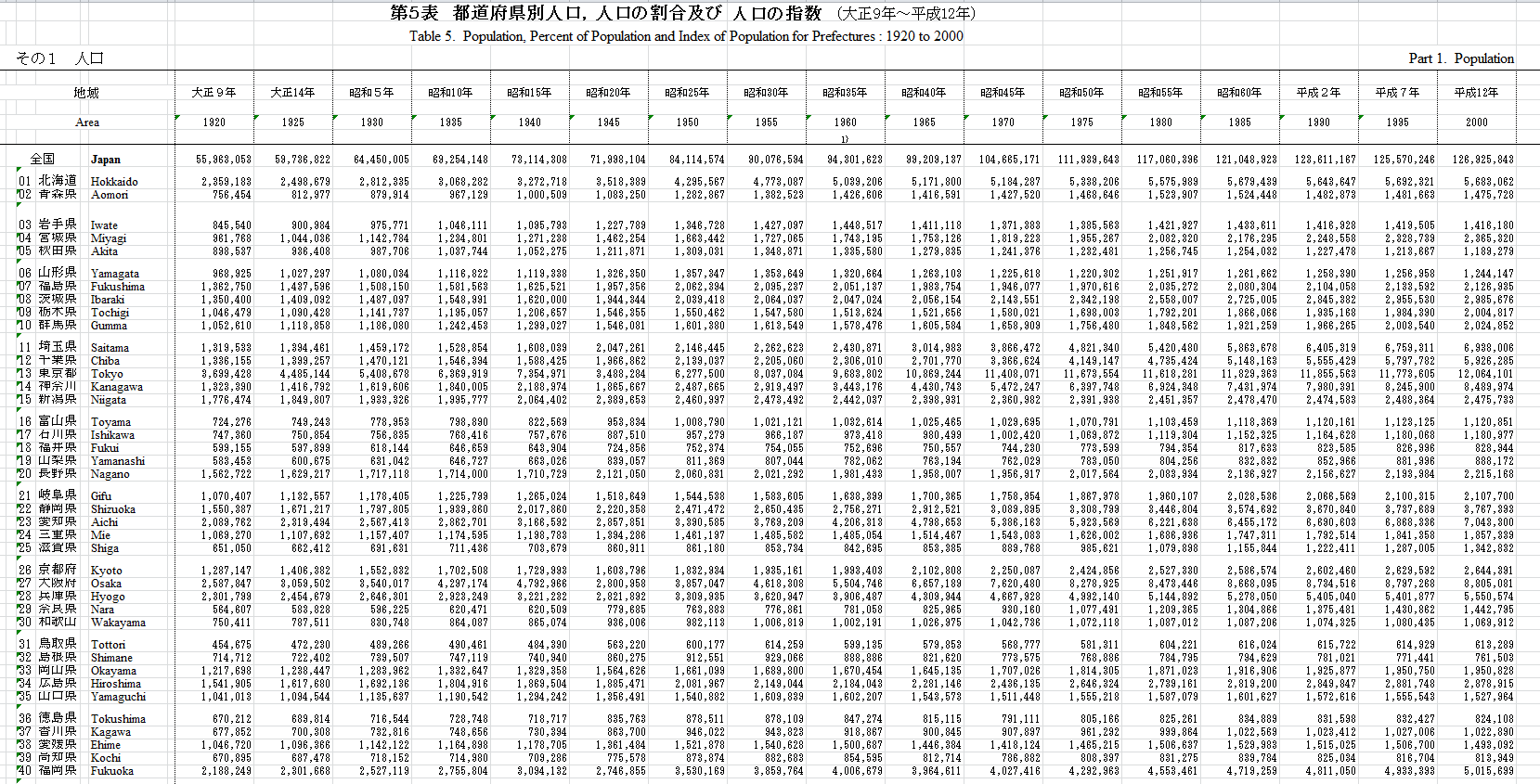
In the image below, you’ll see some Excel files that I extracted from the Japanese Statistics Bureau depicting the median age by prefecture:

As you can see, most of the spreadsheet is in Japanese, but the prefectures were ordered in ISO_3166-2 territory codes, which enabled me to figure out which prefecture was which. You can view the complete dataset here if you have Google Docs. From this table you’ll find that the Median age has more than doubled in several prefectures. I extracted the figures into a .csv file and imported it into RStudio to generate the images used to create the .gif in the next image. The image below is an animated figure depicting the shift in Median age since 1920 (click for full resolution):

Median Age by Prefecture, 1920 – 2005
(Click on Image for Full Resolution)

The above image was generated using the code below (click ‘show source’ to show source):

[sourcecode language=”r” toolbar=”TRUE” wraplines=”FALSE” collapse=”TRUE”]
setwd("./Japan/")
library(maptools)
library(RColorBrewer)
##substitute your shapefiles here
state.map <- readShapeSpatial("JPN_adm0.shp")
counties.map <- readShapeSpatial("JPN_adm1.shp")
## these are the variables we will be plotting
jpnmedage <- read.csv("JpnMedAge1920-2005.csv",header=TRUE)
str(jpnmedage)
counties.map@data$x1920 <- jpnmedage$X1920
counties.map@data$x1930 <- jpnmedage$X1930
counties.map@data$x1940 <- jpnmedage$X1940
counties.map@data$x1950 <- jpnmedage$X1950
counties.map@data$x1960 <- jpnmedage$X1960
counties.map@data$x1970 <- jpnmedage$X1970
counties.map@data$x1980 <- jpnmedage$X1980
counties.map@data$x1990 <- jpnmedage$X1990
counties.map@data$x2000 <- jpnmedage$X2000
counties.map@data$x2005 <-jpnmedage$X2005
## put the lab point x y locations of the zip codes in the data frame for easy retrieval
labelpos <- data.frame(do.call(rbind, lapply(counties.map@polygons, function(x) x@labpt)))
names(labelpos) <- c("x","y")
counties.map@data <- data.frame(counties.map@data, labelpos)

plot.heat <- function(counties.map,state.map,z,title=NULL,breaks=NULL,reverse=FALSE,cex.legend=1,bw=.2,col.vec=NULL,plot.legend=TRUE) {
##Break down the value variable
if (is.null(breaks)) {
breaks=
seq(
floor(min(counties.map@data[,z],na.rm=TRUE)*10)/10
,
ceiling(max(counties.map@data[,z],na.rm=TRUE)*10)/10
,.1)
}
counties.map@data$zCat <- cut(counties.map@data[,z],breaks,include.lowest=TRUE)
cutpoints <- levels(counties.map@data$zCat)
if (is.null(col.vec)) col.vec <- heat.colors(length(levels(counties.map@data$zCat)))
if (reverse) {
cutpointsColors <- rev(col.vec)
} else {
cutpointsColors <- col.vec
}
levels(counties.map@data$zCat) <- cutpointsColors
plot(counties.map,border=gray(.8), lwd=bw,axes = FALSE, las = 1,col=as.character(counties.map@data$zCat))
if (!is.null(state.map)) {
plot(state.map,add=TRUE,lwd=1)
}
##Edit the legend information here
if (plot.legend) legend("bottomleft",inset=c(0.03,0),c("20-25","25-30","30-35","35-40","40-45","45+"), fill = cutpointsColors,bty="n",title=title,cex=cex.legend)
##title("Cartogram")
}

plot.heat(counties.map,state.map,z="x1920",breaks=c(20,25,30,35,40,45,Inf),col.vec=brewer.pal(6,"Purples"),plot.legend=TRUE,reverse=FALSE,title="Median Age")
title(main="Japan: Median Age by Prefecture, 1920")

plot.heat(counties.map,state.map,z="x1930",breaks=c(20,25,30,35,40,45,Inf),col.vec=brewer.pal(6,"Purples"),plot.legend=TRUE,reverse=FALSE,title="Median Age")
title(main="Japan: Median Age by Prefecture, 1930")

plot.heat(counties.map,state.map,z="x1940",breaks=c(20,25,30,35,40,45,Inf),col.vec=brewer.pal(6,"Purples"),plot.legend=TRUE,reverse=FALSE,title="Median Age")
title(main="Japan: Median Age by Prefecture, 1940")

plot.heat(counties.map,state.map,z="x1950",breaks=c(20,25,30,35,40,45,Inf),col.vec=brewer.pal(6,"Purples"),plot.legend=TRUE,reverse=FALSE,title="Median Age")
title(main="Japan: Median Age by Prefecture, 1950")

plot.heat(counties.map,state.map,z="x1960",breaks=c(20,25,30,35,40,45,Inf),col.vec=brewer.pal(6,"Purples"),plot.legend=TRUE,reverse=FALSE,title="Median Age")
title(main="Japan: Median Age by Prefecture, 1960")

plot.heat(counties.map,state.map,z="x1970",breaks=c(20,25,30,35,40,45,Inf),col.vec=brewer.pal(6,"Purples"),plot.legend=TRUE,reverse=FALSE,title="Median Age")
title(main="Japan: Median Age by Prefecture, 1970")

plot.heat(counties.map,state.map,z="x1980",breaks=c(20,25,30,35,40,45,Inf),col.vec=brewer.pal(6,"Purples"),plot.legend=TRUE,reverse=FALSE,title="Median Age")
title(main="Japan: Median Age by Prefecture, 1980")

plot.heat(counties.map,state.map,z="x1990",breaks=c(20,25,30,35,40,45,Inf),col.vec=brewer.pal(6,"Purples"),plot.legend=TRUE,reverse=FALSE,title="Median Age")
title(main="Japan: Median Age by Prefecture, 1990")

plot.heat(counties.map,state.map,z="x2000",breaks=c(20,25,30,35,40,45,Inf),col.vec=brewer.pal(6,"Purples"),plot.legend=TRUE,reverse=FALSE,title="Median Age")
title(main="Japan: Median Age by Prefecture, 2000")

plot.heat(counties.map,state.map,z="x2005",breaks=c(20,25,30,35,40,45,Inf),col.vec=brewer.pal(6,"Purples"),plot.legend=TRUE,reverse=FALSE,title="Median Age")
title(main="Japan: Median Age by Prefecture, 2005")

## plot text
# with(counties.map@data[c(-2,-10,-25,-28,-32),], text(x,y,NAME_1,cex=.7,font=2))
# with(counties.map@data[2,],text(x,y+1.1,NAME_1,cex=.7,font=2))
# with(counties.map@data[28,],text(x+1.7,y+.7,NAME_1,cex=.7,font=2))
# with(counties.map@data[10,],text(x-.5,y-1,NAME_1,cex=.7,font=2))
# with(counties.map@data[25,],text(x+3.3,y,NAME_1,cex=.7,font=2))
# with(counties.map@data[32,],text(x-.7,y,NAME_1,cex=.7,font=2))
[/sourcecode]

To get a better idea of what that data meant, I should have included a graphic of the ratio of working to retired population (and maybe birth rates as well), but I didn’t have the time. Anyway, when the population of Japan declines, it won’t decline uniformly across the age groups. As the population declines, the ratio of old to young people will increase dramatically, putting a strain on younger workers to care for the old. This will result in a labor shortage, and possibly a pensions crisis as the income of the younger workers won’t be enough to fund the pensions of the retired population. Japan also has a very high proportion of debt to GDP – about 200% (twice the ratio of the United States’) – and I suspect the dual strains of having to care for the older workers and make interest payments on the debt will leave the next generation of Japanese without enough funds to provide for their own children, leading to a further decline in birthrate, and even fewer people to care for this generation when they retire – it’s a vicious cycle.

For my next example, I calculated 5-year population growth rates by prefecture using the census data below, also obtained from the Japanese Statistics Bureau:

You can view the full dataset here with Google Docs. I used R code similar to the code shown previously to generate the animated image below (click on the picture for full resolution), which shows the change in growth rate by prefecture over time:

Projected Population Change, 1925-2025
(Click on Image for Full Resolution)

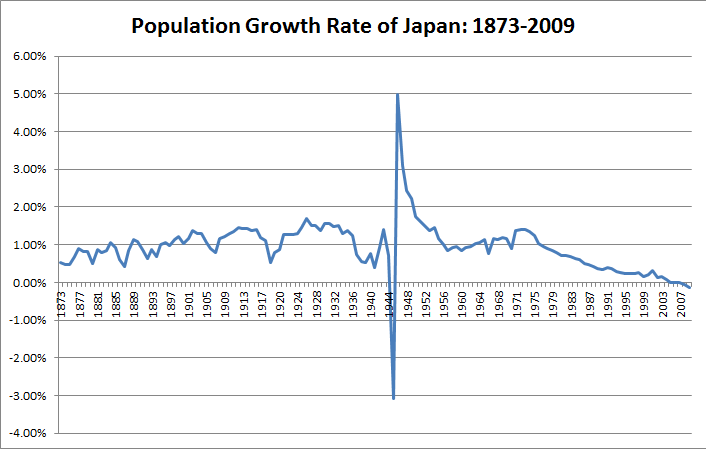
The graph below shows the national annual growth rate from 1873 to 2009:

In the above graph and the animated picture above, you’ll see the dramatic shift in growth rate during the WW2 years.

Final Notes

It’s clear to me that Japan will have to increase immigration or implement policies to stabilize the population. The nation will also have to implement policy reform to get its debt under control so as to not cripple the economy in the next few decades.

In this post I’ve also shown some of the other capabilities of the package RColorBrewer – you can see in the very top picture, along with the last map, that I used divergent color palettes instead of a continuous one. That was especially helpful in depicting negative growth rates.

Posted in: Mathematics / Tagged: japan median age by prefecture, map graphics with R, populatin of japan by prefecture, population decline in Japan, population of japan

Post Navigation

« Previous 1 … 14 15 16 17 18 … 30 Next »

Archives

  • August 2025
  • July 2025
  • September 2023
  • February 2023
  • January 2023
  • October 2022
  • March 2022
  • February 2022
  • December 2021
  • July 2020
  • June 2020
  • May 2020
  • May 2019
  • April 2019
  • November 2018
  • September 2018
  • August 2018
  • December 2017
  • July 2017
  • March 2017
  • November 2016
  • December 2014
  • November 2014
  • October 2014
  • August 2014
  • July 2014
  • June 2014
  • February 2014
  • December 2013
  • October 2013
  • August 2013
  • July 2013
  • June 2013
  • March 2013
  • January 2013
  • November 2012
  • October 2012
  • September 2012
  • August 2012
  • July 2012
  • June 2012
  • May 2012
  • April 2012
  • March 2012
  • February 2012
  • January 2012
  • December 2011
  • September 2011
  • August 2011
  • July 2011
  • June 2011
  • January 2011
  • December 2010
  • October 2010
  • September 2010
  • August 2010
  • June 2010
  • May 2010
  • April 2010
  • March 2010
  • September 2009
  • August 2009
  • May 2009
  • December 2008

Categories

  • Actuarial
  • Cycling
  • FASLR
  • Logs
  • Mathematics
  • MIES
  • Music
  • Uncategorized

Links

Cyclingnews
Jason Lee
Knitted Together
Megan Turley
Shama Cycles
Shama Cycles Blog
South Central Collegiate Cycling Conference
Texas Bicycle Racing Association
Texbiker.net
Tiffany Chan
USA Cycling
VeloNews

Texas Cycling

Cameron Lindsay
Jacob Dodson
Ken Day
Texas Cycling
Texas Cycling Blog
Whitney Schultz
© Copyright 2026 - Gene Dan's Blog
Infinity Theme by DesignCoral / WordPress