• Home
  • Readings
  • Github
  • MIES
  • TmVal
  • About
Gene Dan's Blog

No. 42: The Great Internet Mersenne Prime Search – How to Install and Start GIMPS on Ubuntu 11.10

3 January, 2012 6:28 AM / 2 Comments / Gene Dan

Hey everyone,

When I said that I’d update this blog once a week, I didn’t realize that I’d have to post five times as many updates as I did last year. Fortunately, I don’t see this as something I can’t do so I decided to make it my new year’s resolution. Today I’ve decided to write about the Great Internet Mersenne Prime Search (GIMPS)- an online distributed computing project that aims to find Mersenne Primes.  Distributed computing means that several computers on a network work together on a certain task. In the case of the Great Mersenne Prime Search, these computers come from university computer labs, homes, and even video game consoles all across the world. Other distributed computing projects involve protein folding (perhaps the most famous), finding extraterrestrial life, searching for gravitational waves, and so on and so forth. These projects work by utilizing spare processing power from participating computers. All this processing power put together makes for a very powerful network, and these projects have already made important discoveries, such as a protein structure related to HIV. Anyway, after I set up my Linux server, which runs throughout the day, I decided that letting it run idly would waste a lot of processing power, so I decided to install a program from a distributed computing project. I chose GIMPS because I spent some time studying the Mersenne primes in school, so as a math major this project would come naturally to me. I couldn’t find a suitable setup guide for Ubuntu 11.10, however, so I decided to write one here.

About Mersenne Primes

We call numbers of the form $latex M_p = 2^p-1$ Mersenne Numbers. However, only a few of these Mersenne Numbers belong to the set of prime numbers, and as of 2009 we know of only 47 Mersenne Primes. The nature of Mersenne Primes makes them some of the largest known prime numbers out there, and indeed, the largest known prime, $latex 2^{43112609}-1$, is a Mersenne Prime. The Great Internet Mersenne Prime Search aims to find additional Mersenne Primes through distributed computing using the Lucas-Lehmer test for Mersenne Primes.

Downloading GIMPS

Go to the GIMPS homepage, and click on the link “Getting Started.” Go to the link called “Register a new user account login” and create your user account. After you create your account, go to the Download Software page and select the package appropriate for your operating system. Since I use 64-bit Ubuntu, I downloaded the 64-bit Linux package. Place the package into the desired directory. For my computer, I created a folder called “GIMPS” in my home folder, and put the package there.

Placing the package into the GIMPS folder and opening it with Archive Manager

Next, click open the package with Archive Manager and then extract the files. Archive Manager will extract the files into the GIMPS folder.

GIMPS folder after extraction

Next, open up the terminal (CTRL+ALT+T) and change the directory to the GIMPS folder (do this simply by typing “cd GIMPS”). Now, open the mprime folder by typing in the command “./mprime -m”. Remember the space! The program “mprime” is the main program that will do the primality testing.

Use these commands to start mprime

mprime will now ask you if you want to join GIMPS. Select yes. Then, mprime will ask you to create an optional user ID and computer name. Fill these out – for example I entered my name as “gene” and my computer name as “Archimedes.” You can leave the proxy host name blank, just press enter. Then, type “Y” when mprime asks you to accept the above answers.
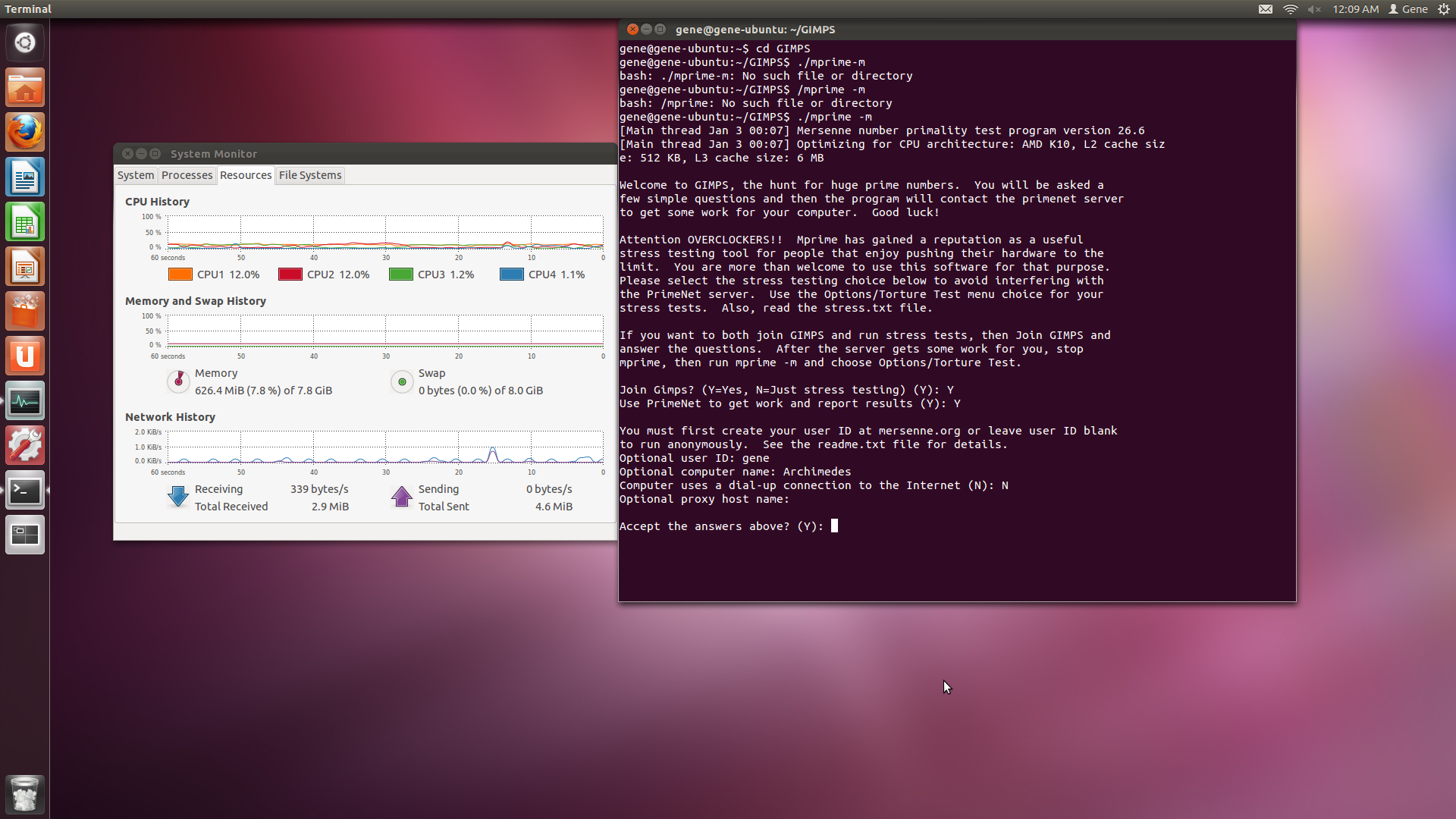
Initial running of mprime

mprime will then ask you the number of hours per day the program will run, how much memory to let it use, and the number of workers (number of CPUs) that will run. The default answers to these questions are in parentheses (). I selected the defaults for all of them. You do have the option to use more memory to speed up the program, however. mprime will then ask you to set the work priorities for your computer. Go ahead and select all the defaults, this will allow mprime to automatically allocate work to your processors. After accepting the answers, you will see your terminal window fill up with a bunch of text. This text describes which Mersenne Numbers your CPUs are testing, how much progress they’ve made, and the estimated completion dates. Depending on how you set it up, you may have missed the main menu. On my first install I saw the menu right away, but on the second install the program seemed to have skipped over the menu.

Here is a screenshot of the menu:

mprime options menu

Go ahead and select option 3. This will give you a summary of the progress.
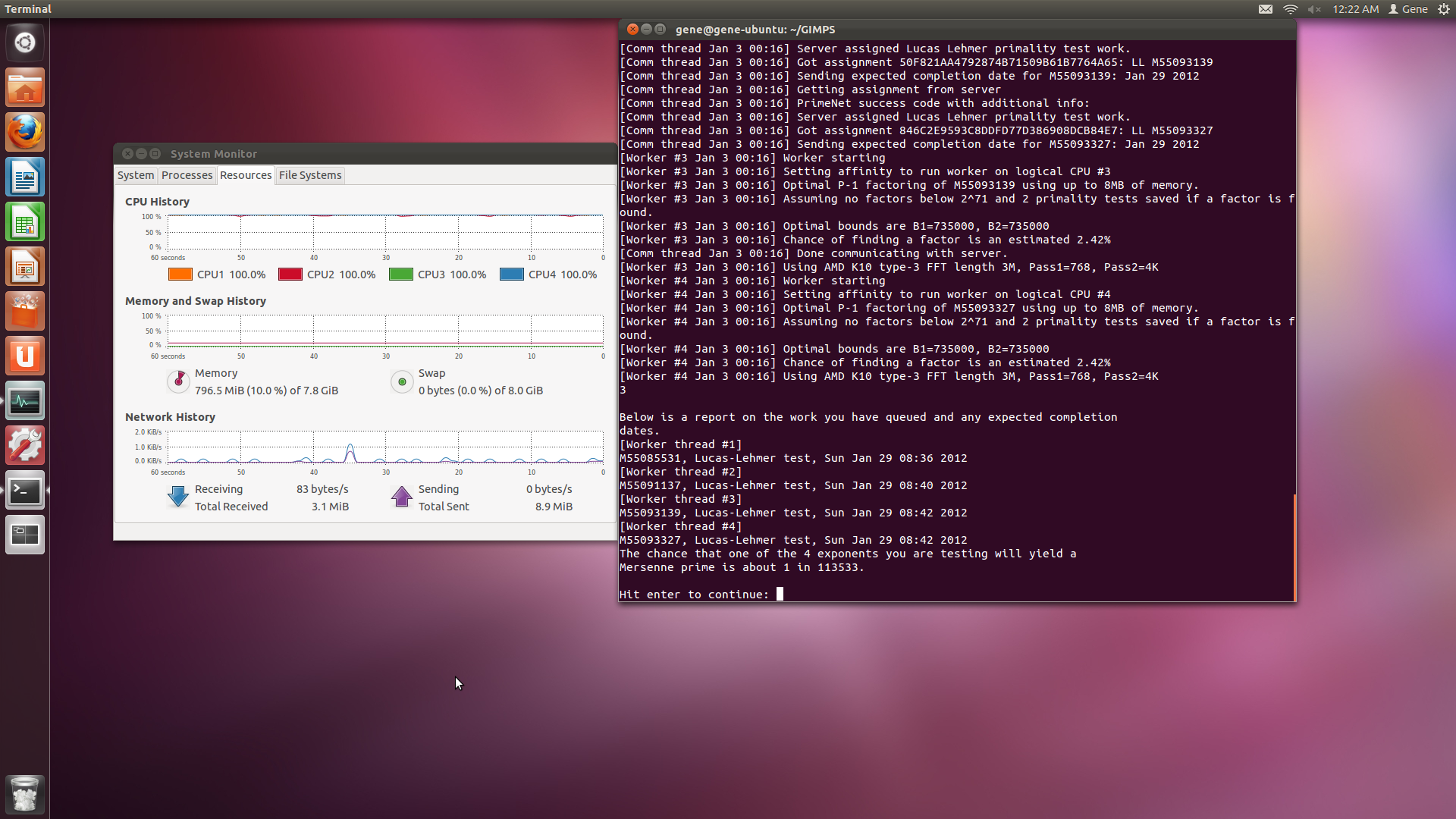
mprime at work, showing progress

You can see here that my version of mprime is currently testing Mersenne numbers M55085531, M55091137, M55093139, and M55093327 using the Lucas-Lehmer test. The number after the M is the p in $latex M_p = 2^p-1$. So as you can see, these are very large numbers. The odds of me finding a Mersenne prime are 1 in 113533 for this current batch of tests!

And that’s it! Press any key to continue, and select option 5 to exit.

Things to do

You can see from the last picture that mprime will cause your computer to constantly use 100% of its processing power, 24 hours a day. This somewhat concerns me when it comes to temperatures, as I don’t want things to overheat while I’m away from the computer or at work. So, I plan on writing a script to have the server save the temperature readings into a text file so I can check on it periodically from a phone or another computer, and in the case of an emergency I can shut it down remotely.

If you think there’s anything missing in this guide, or if you think you have anything useful to add, or if you find any errors, let me know! I’m always open to input from others.

Posted in: Logs, Mathematics / Tagged: Distributed Computing, GIMPS, Great Internet Mersenne Prime Search, Installing GIMPS, Mersenne Primes

No. 41: Project No. 1 – An Eternal Memory Bank via LaTeX; Project No. 2 – RStudio via Linux Server

27 December, 2011 5:55 AM / 3 Comments / Gene Dan

Hey everyone,

Let me introduce you to a couple of projects that I began working on over the last week – a memory bank written in LaTeX and a Linux server hosting RStudio for my predictive modeling projects. I started working on these tasks in order to give myself challenges that would develop my skills, because I had noticed that after I graduated college, the sudden scarcity of drilling, testing, and intellectually stimulating tasks other than actuarial exams or projects at work led to what I felt was a lack of cognitive development, creative activity, and perhaps even a decline in my working memory. This doesn’t mean that I hadn’t done anything in the meantime, however. Over the past year I’ve continued my studies at a pace of around 14-20 hours per week reading things that I found interesting. For instance, I’ve been reading a book on European History because I never got the chance to take a course on it in high school or college. I think over the past year I may have studied more hours than I had in any year of my life. During exam time, I studied a year’s worth of material on Life Contingencies in a span of 3 months. However, I’ve realized that studying can only get you so far. I’ve heard countless times that you have to put down the books if you want to get good at something – you cannot, for instance, learn to ride a bike by reading a book on riding a bike – you actually have to get yourself on a bicycle, ride, fall down, learn from your mistakes, and try again. Thus, I decided to begin a series of projects in order to actively learn by creating. In this way, I hope to keep myself sharp, motivated, and most importantly, intellectually fulfilled.

Project 1: Eternal Memory Bank

I haven’t forgotten about $latex LaTeX$, the markup language that I set about learning around this time last year, though I have forgotten much of the syntax I need to typeset mathematical notation. Unfortunately, using LaTeX via WordPress, as I had done last year, presents some significant drawbacks due to syntactical differences and the fact that I can’t develop my typesetting skills further if I only use LaTeX within my blog. Thus, I’ve decided to construct a memory bank as a complete LaTeX document that you can print out as a book. I first had to start out by learning all the things I forgot over the last year by reading Kopka and Daly’s Guide to LaTeX, at an extremely slow pace – sometimes as slow as 5 pages per minute – though fortunately, it does has some very good exercises. For instance, the following table took me more than an hour to produce:

An excercise in constructing arrays and adjusting formulas

By means of the following input:

[sourcecode]
documentclass{article}
newcommand{D}{displaystyle}
newcommand{bm}{boldmath}
newcommand{ba}{begin{array}}
newcommand{ea}{end{array}}
begin{document}
[ ba{|c|c|c|} hline
multicolumn{3}{|c|}{rule[-2mm]{0mm}{6mm}mbox{Equations for the tangential plane and surface normal}} \ hline
mbox{Equation} & & \
mbox{for the} & mbox{ Tangential plane} & mbox{Surface normal} \
mbox{surface} & & \ hline
F(x,y,z)=0 &ba[t]{r@{{}+{}}l}
D{frac{partial F}{partial x}}(X-x) & rule[0mm]{0mm}{8mm} D{frac{partial F}{partial y}}(Y-y) \[4mm]
& D{frac{partial F}{partial z}}(Z-z)=0
ea & ba[t]{r@{{}={}}c@{{}={}}l}
D{frac{X-x}{D{frac{partial F}{partial x}}}} & D{frac{Y-y}{D{frac{partial F}{partial y}}}} & D{frac{Z-z}{D{frac{partial F}{partial z}}}}
ea \[13mm]
z=f(x,y) & Z-z =p(X-x)+q(Y-y) &D{frac{X-x}{p}=frac{Y-y}{q} = frac{Z-z}{-1}} \[4mm]
ba{c}
x=x(u,v)\
y=y(u,v)\
z=z(u,v)\ ea &
left|ba{ccc}
X-x & Y-y & Z-z\
D{frac{partial x}{partial u}} & D{frac{partial y}{partial u}} & D{frac{partial z}{partial u}}\[3mm]
D{frac{partial x}{partial v}} & D{frac{partial y}{partial v}} & D{frac{partial z}{partial v}}\ ea right| = 0 &
ba{r@{{}={}}l}
D{frac{X-x}{left|ba{cc}
frac{partial y}{partial z} & frac{partial z}{partial u}\[1mm]
frac{partial y}{partial v} & frac{partial z}{partial v} ea right|}} &
D{frac{Y-y}{left|ba{cc}
frac{partial z}{partial u} & frac{partial x}{partial u}\[1mm]
frac{partial z}{partial v} & frac{partial x}{partial v} ea right|}}\[10mm]
& D{frac{Z-z}{left|ba{cc}
frac{partial x}{partial u} & frac{partial y}{partial u}\[1mm]
frac{partial x}{partial v} & frac{partial y}{partial v} \ ea right|}} ea \[15mm]
rule[-5mm]{0mm}{0mm}mbox{boldmath{$r=r$}}(u,v) & ba{r@{{}={}}l}
mbox{boldmath{$(R-r)(r_1times r_2)$}} & 0\
mbox{or} hfill mbox{boldmath{$(R-r)N$}} & 0\ ea & ba{r@{{}+{}}l}
mbox{boldmath{$R=r$}} & mbox{boldmath{$lambda(r_1times r_2)$}} \
mbox{or boldmath{$R=r$}} & mbox{boldmath{$lambda N$}}ea \ hline
multicolumn{3}{|c|}{rule[0mm]{0mm}{10mm}parbox{116mm}{In this table, $x,y,z$ and $mathbf{r}$ are the coordinates and the radius vector of a fixed point $M$ on the curve; $X,Y,Z,$ and $mathbf{R}$ are the coordinates and radius vector of a point on the tangential plane or surface normal with reference to $M$; furthermore, $p =frac{partial z}{partial x}, q=frac{partial z}{partial y}$ and $mathbf{r_1}=mathbf{frac{partial r}{partial mathnormal{u}}, r_2=frac{partial r}{partial mathnormal{v}}}$.}}\ hline
ea ]
end{document}[/sourcecode]

As you can see, the code does not look pretty. Fortunately, on another go I believe I can reproduce the above table in about 15 minutes, and perhaps even faster on the third try.

Anyway, I began putting the pieces of my Eternal Memory Bank a couple weeks ago and spent the last couple of weeks putting what little I had together for this post. If you’ve taken a look at my Projects page, you can see that I’ve been learning College Algebra over the last few months – not because I don’t know algebra but because I felt that I needed to fill in a few gaps left behind by my inadequate high school education, and because I’ve forgotten a lot since then and I thought perhaps that I could get some new insight by revisiting an old subject. I decided to extract a few pieces of information that I really ought not to forget – and put them into this memory bank to commit to memory, forever. You can download the pdf from my SkyDrive here and the TeX file here.

An excerpt from the Preface:

“Hey everyone,

I’ve decided to construct an eternal memory bank, within which I’ve placed
select pieces of information that I’ve deemed important enough to commit to
memory, forever. This document serves as a visual representation of these
pieces in written form. I’ve undertaken this seemingly somewhat tedious and
arbitrary project to keep my memory in shape and because I’m sick and tired
of forgetting the formula to (a+b)^3 and having to either work out the expan-
sion every time it shows up (usally once in a blue moon for me) or look it up (I
usually work out the expansion out of pride, or just use the bionomial theorem).
In other words, these things take up precious time and I would much rather be
able to pull them immediately from memory than to rely on something that
may be in another book in some distant library or buried underneath mounds
of links in a website like Wikipedia.

Let me stress that I am not relying on memory for all of my tasks – that would
be ridiculously insane. You cannot solve complex problems on rote memory
alone becuase they require creativity and higher-level analytical skills. On the
other hand, there are some things you absolutely must memorize – for instance
as I write I am pulling out every single word on this page by memory. You can
gure out some words with context clues and associations, but if you have to
do that with every word during a conversation that is also absolutely, insanely
ridiculous.

So, welcome to my Eternal Memory Bank. Everything you see here, including
the fonts, document structure, Table of Contents – I guarantee you I’ve memo-
rized it. So, take a look, give me feedback if you wish, and enjoy.”

Project 2: RStudio via Linux Server

My second project began as a side project to my real job when my boss recommended that I check out Kaggle and sign up for their predictive modeling competitions. For those of you who don’t know, the website Kaggle hosts a series of predictive modelling competitions and awards cash prizes to the winners. The competitors include PhD-level academics, statisticians, mathematicians, hobbyists, and actuaries like me. I think of this as an excellent opportunity to see how the experts operate – the cash prize merely serves as icing on the cake, and I don’t really have the ambition to go for the top prize as of now.

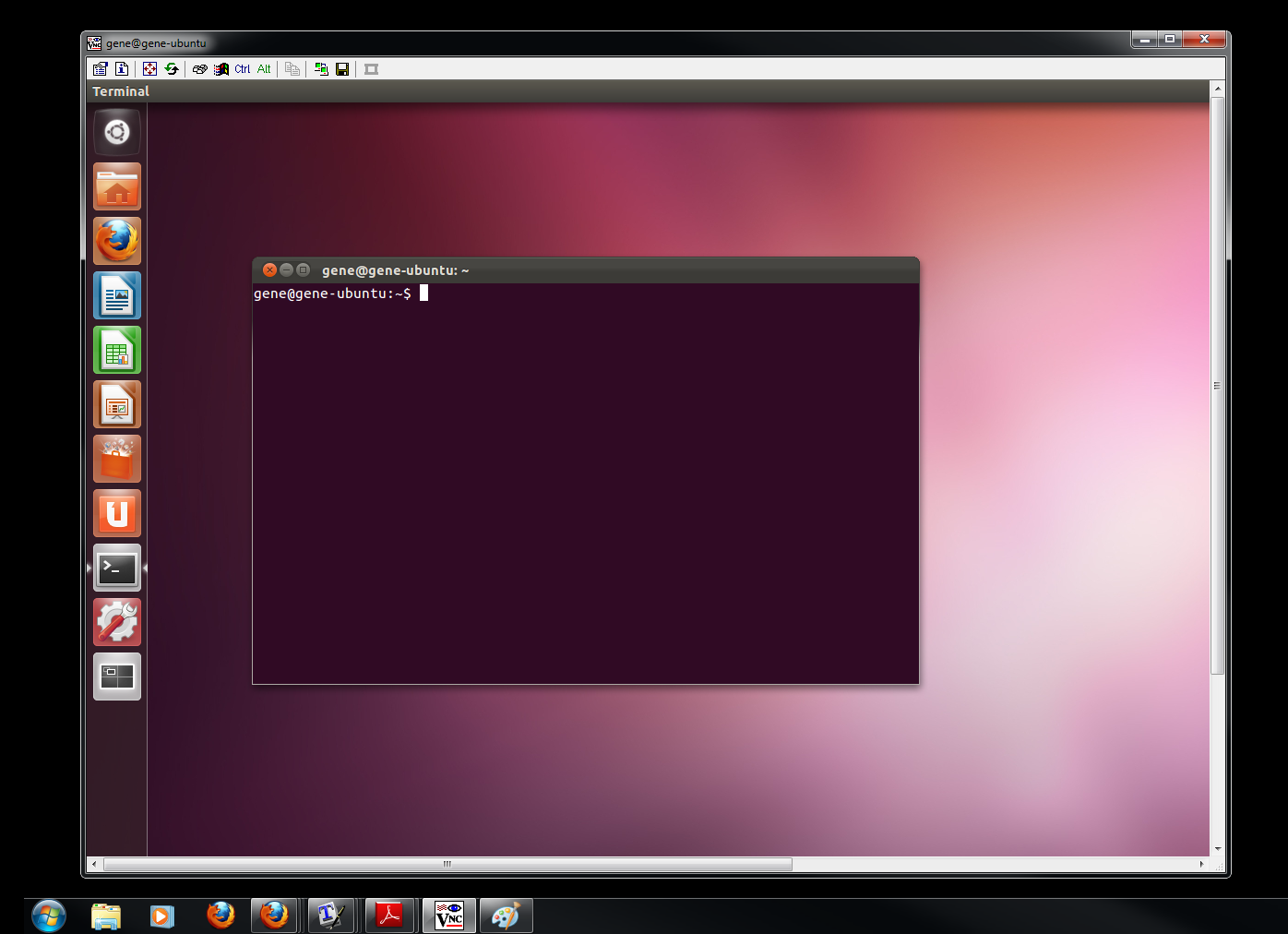
To set up a base for myself and the rest of my team members, I decided to construct a Linux server out of an old computer I had laying around – it has some new components though, like an Athlon II x4 processor and plenty of RAM – 8GB. The server currently operates on ubuntu 11.10 “Oneric Ocelot,”  though I may change my mind and set up an ssh server using Ubuntu Server instead. In addition to the Ubuntu, I set up my Windows machine in a way that lets me control the Ubuntu Server remotely – including shutting down, turning on, logging in etc.

Logging into the server remotely with Tight VNC

After installing the server I downloaded RStudio server, a GUI developed by a group of volunteer programmers that allows people to connect to R remotely through their own Windows machines. In this manner I hope that my teammates and I can collaborate on our projects. I first asked some of my friends to try logging in but they couldn’t do it – so I asked my more technically savvy friends what to do and they suggested that I set up a static IP and forward port 8787 on my router. After doing so, they successfully logged in! Now I, or anyone on my team can access the server anywhere with an internet connection – hotels, coffee shops, etc.

Connecting to the RStudio GUI though Firefox on my Windows machine

Well that’s pretty much it, I have to say I’m happy that I posted this week as promised. I used to have trouble with these things as a kid but I feel that I’ve stayed on task much better as an adult. One study claims that it’s because kids have too much grey matter. My dad once said that “smart people just explain things away” when I tried giving him excuse one time as to why I forgot to replace the window stickers inside my car last year. I had trouble understanding what he meant but I think he meant that when scientists come up with explanations for these phenomena (in this case, why kids can’t stay on task), people use these explanations as excuses for their bad behavior. Thanks, Dad. Stay tuned for next week’s posting!

Posted in: Logs / Tagged: Kaggle, LaTeX, Remote Desktop, RStudio, Ubuntu

No. 40: TXBRA End-of-Season Update

19 December, 2011 1:03 AM / Leave a Comment / Gene Dan

Hey everyone,

The Texas Bicycle Racing Association (TXBRA) road season actually ended two months ago in October, but I spent most of my free time studying for exam MLC. I think I spent about 300-400 hours in total, so as you can see the exam represents a more challenging hurdle than your typical college-level test. I took the exam about a month ago in early November and I won’t receive my results until the 6th of January. Overall, I think I did well on the exam – I paced myself correctly and I only struggled with a handful of questions. Then again, you never know how these tests turn out until you get your result, so in the meantime I’ve been focusing on work, study, and cycling to ease the anxiety of waiting.

Anyway, I don’t have to worry about taking another test until May so I’ve decided to update this blog every weekend starting now. I have two and a half months until my first race, so you won’t be getting any more race reports until March – but I’ve decided to devote my time each week to work on a project of my choosing – for example, next week I’ll post about a LaTeX project that I spent the last two weeks setting up. I imagine that most of the updates will focus on Mathematics, Computers, or Statistics, or maybe just whatever happens to excite me at the time. Today’s entry covers the events from the last important road race of the season – the Fort Hood State Championships – along with some minor and major events that occurred between then and now.

I don’t have much to say about Fort Hood – the nasty climb at the beginning of the race, over which I struggled last year, surprisingly didn’t pose much of a problem on the first ascent. Unfortunately, as a category 4 racer this year I would have to ascend the climb twice. After the first climb I still felt fresh, but a series of nasty attacks, accelerations, and a brutal crosswind on top of that left me gasping for breath after an hour of hard racing. I spent the next 10 minutes alone until Doug Baysinger and Tom Warnement caught up with me, and together we closed out the first lap. Doug ended up having a pinched nerve in his neck and had to pull out, and Noe Espinosa, another Shama racer, vanished from the pack after the first climb and had to abandon as well. This left Bill Krause as the only team member in the pack and he finished a respectable 26th. I finished way down, in 78th place. Said Assali, a Shama category 5 racer, finished 8th in his race. Bill Fiser, a category 3 racer, ended his season as the State Champion – and has now upgraded to category 2.

Overall, in terms of results, I had a mediocre season. Last year, I had four top-10 finishes whereas this year I only had one. On the other hand, I view this season as a better one developmentally – as I had bigger improvements in strength and racing knowledge. Sometime after Fort Hood, I upgraded my bike with two important training tools – a heart rate monitor and a Quarq power meter, coupled with a Garmin Edge 500 – which allow me to monitor my data with greater breadth, depth, and precision.

Quarq Power Meter with Rotor Crank

To help me with my training, Ken Day recommended that I read Training and Racing with a Power Meter by Hunter Allen and Andrew Coggan. I also plan to read Friel’s The Cyclist’s Training Bible, which serves as an essential reference to any competitive cyclist.

Profile from Last Thursday

Other than Fort Hood and exam MLC, not much has happened since then, although one event does stick out as something that I’ll remember for the rest of my life. After my exam, I hadn’t trained for about a month and lost a lot of my fitness, and since then I’ve gradually built it back up by returning to the early morning group rides. On one particular Friday morning I decided to go out with the group even though I normally don’t ride on Fridays, because these rides tend to be easier than the Tuesday rides. For the first hour everything went smoothly until we hit Eldridge Parkway at Memorial. I remember talking to Trent about a Mac Book Air that he wanted to buy and as we set off after the light we continued for a few hundred yards until we found another Shama rider lying on the ground on the other side of the street. At first I thought we had a typical crash within the group but it seemed strange as there weren’t any typical “crash noises” (tires streaking, yelling, bikes hitting the ground, etc.) that I would have heard ahead of time. When we stopped to assist the rider, it was clear that the accident had occured on the other side of the street, away from the group. On closer inspection we realized the rider was Philip Shama, and after seeing a Mustang with a broken windshield stopped a few meters ahead we knew that Philip was in serious trouble. John Neese called 911 and the others tried to keep Philip still although he kept trying to move around in a state of semi-consciousness, muttering incoherently and wiggling his fingers. The ambulance and fire truck arrived in minutes and got Philip to the hospital.

Early Morning Ride, 30 minutes before we found Philip.

Apparently, the driver, who was moving in the opposite direction to the group, saw all of our lights and became distracted. Philip, who sometimes rides opposite to the group to catch us midway during the ride, rode in front of the driver. The driver failed to see Philip and rear-ended him, shattering the rear triangle of his bike. Philip went over the trunk and broke the windshield of the car, and hit his head. He ended up with a broken leg, arm, and collarbone, and had a severe concussion with some brain bleeding. We were all in a state of shock as we rode back and we didn’t get to hear about his condition until noon. I was very uneasy until then, and after a day or two we realized that he was okay.

It’s times like this that stress the importance of bike safety, especially when riding in the dark. Had it not been for his helmet, Philip would have died that day. Just last week a very promising Texas racer Megan Baab was killed during a training ride. The sport is not without its risks, but we have to take the necessary precautions to be safe if we want to do the things we enjoy. I’m just glad that Philip’s alright. The cycling community wouldn’t be the same without him.

Sometimes I have difficulty expressing my gratitude to people but I assure you that I’m very thankful to have met all the Shama racers and people in the Houston cycling community this year, as you’ve done so much for me, as sometimes I find it hard to make friends with people or find people who like to do the same things I like to do, but you’ve all made the processes easier for me.

I’m very excited for next year. We’ve got some strong guys like Said Assali and Phil Trinder moving up to Category 4 next year and I’ll be happy to help them out. Over all, the last year has been very enjoyable, and I’m looking forward to having a great season in 2012.

Posted in: Cycling, Logs

No. 39: Exploring SAGE as an Alternative to Mathematica

21 September, 2011 1:33 AM / 2 Comments / Gene Dan

Hey everyone,

After spending some time experimenting with Mathematica, Maxima, and Sage, I’ve finally decided to use Sage as my primary computer algebra system (CAS)!  In short, computer algebra systems act like high-performance calculators, and their primary strength lies in the fact that they can manipulate mathematical expressions in symbolic form. Sage, in particular, has several benefits over Mathematca:

1) Sage is open source software, which means you can freely download, modify and distribute its source code. Mathematica, on the other hand, is proprietary software and a home license costs $300. If you want to use it for work, it’s a whopping $2500 for an individual license – and you can only install it on one machine. With Sage, it’s affordable, you don’t have to pay more for newer versions, and the fact that it’s open source means you can actively participate in the development community.

2) Sage uses Python. Python is a free programming language and it’s very easy to learn. If you already know Python, you won’t be bogged down learning a new language just to use the software.

3) Sage includes Maxima. Sage is actually made out of more than 90 different mathematical packages – one of which is Maxima – all integrated under a single interface with which you can communicate using only Python. For example, Maxima is written in Lisp, so you would have to learn some of it to become proficient with the program. However, if you use Sage, you can utilize Maxima even if you only know Python.

Sage, released in 2005 is relatively new compared to other CAS programs and still has a lot of raw edges. Known bugs and tasks that need to be completed are posted online and users are free to take on these challenges. I picked up a new, much, much, much needed book, the Sage Beginner’s Guide, which should give me a basic working knowledge of the program. I first tried installing Sage on my Linux machine about 3 years ago, and when I tried doing it then it took a lot of effort and a lot of command-line agony to get it to start working. Now I would say that the package has gone a long way, though it still doesn’t work on Windows. If you want to use it on Windows, you must install a Linux virtual machine using either VirtualBox or VMWare. Right now I have 3 cores and about 4 GB of RAM dedicated to a virtual machine set up on Fedora Linux – from there you can run Sage from your browser:

Sage runs on a Fedora Linux machine

Screenshot of the Sage Notebook Interface

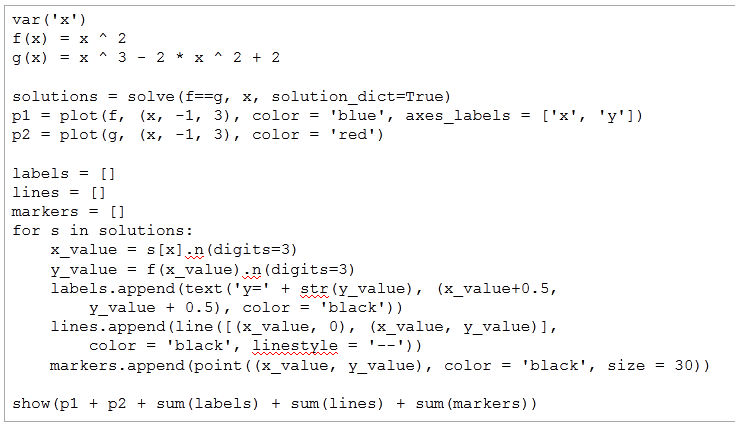
Here are some examples of what Sage can do from the book – we plot 2 functions and place labels at their solutions. The following code:

The code defines the functions, finds the solutions, and plots the graph. Parameters can define labels, colors, etc.

Produces the following image:

Image produced from the preceding code

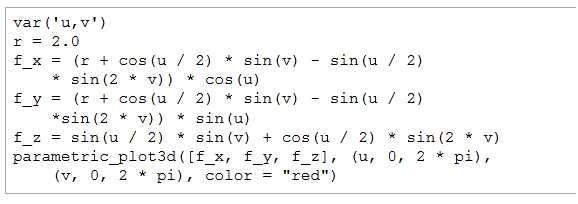
Also, the following code:

Code for plotting a Klein Bottle

Produces a 3D plot of a Klein Bottle:

A Klein Bottle

Sage can also display results in symbolic form:

Partial Fraction Decomposition

Here, Sage instantly calculates the above partial fraction decomposition. Anyone want to try it by hand?

I’m totally hooked. Sage, which is totally free, is extremely powerful – much more powerful than any expensive HP or TI calculator on the market. Right now Mathematica, Matlab, and Maple are more complete software packages that come with professional support, but they come at a cost. However, I think Sage can be the real Mathematica killer, similar to the way that R is currently eating into the market share of SAS – Sage, which is headed by professor William Stein of the University of Washington, is currently under active development by computer programmers and mathematicians all around the world! Check out the Sage website if you want to get involved. The era of extremely high-priced software can only last so long…

Posted in: Logs, Mathematics

No. 38: Chappell Hill & Cotton Patch – Race Report

19 September, 2011 8:15 AM / Leave a Comment / Gene Dan

Hey everyone,

Due to time constraints and the fact that both of these races finished similarly, I decided to write a single post for both of them. After racing Gonzales, I felt strong and very confident – the week afterward, during my usual weekend ride with SCCC, I rode aggressively (probably to the ire of my packmates) and I realized that I could drop the group for long stretches at a time. However, by the time I came back to the 5:30 A.M. MPPPL ride I noticed that I had accumulated fatigue over the long, four-month buildup that I had initiated in March and started fading and getting dropped again, even after putting in serious efforts during my training. I felt that perhaps I had to rest, so I spent 2 weeks doing relatively little training and started to build up again after I came back from California. Unfortunately, that derailed plans for a serious aggressive effort at Chappell Hill, though I did make some good progress on my late-season training cycle. I told Philip that I planned on racing Chappell Hill so he let me borrow some deep-profile clinchers for the weekend:

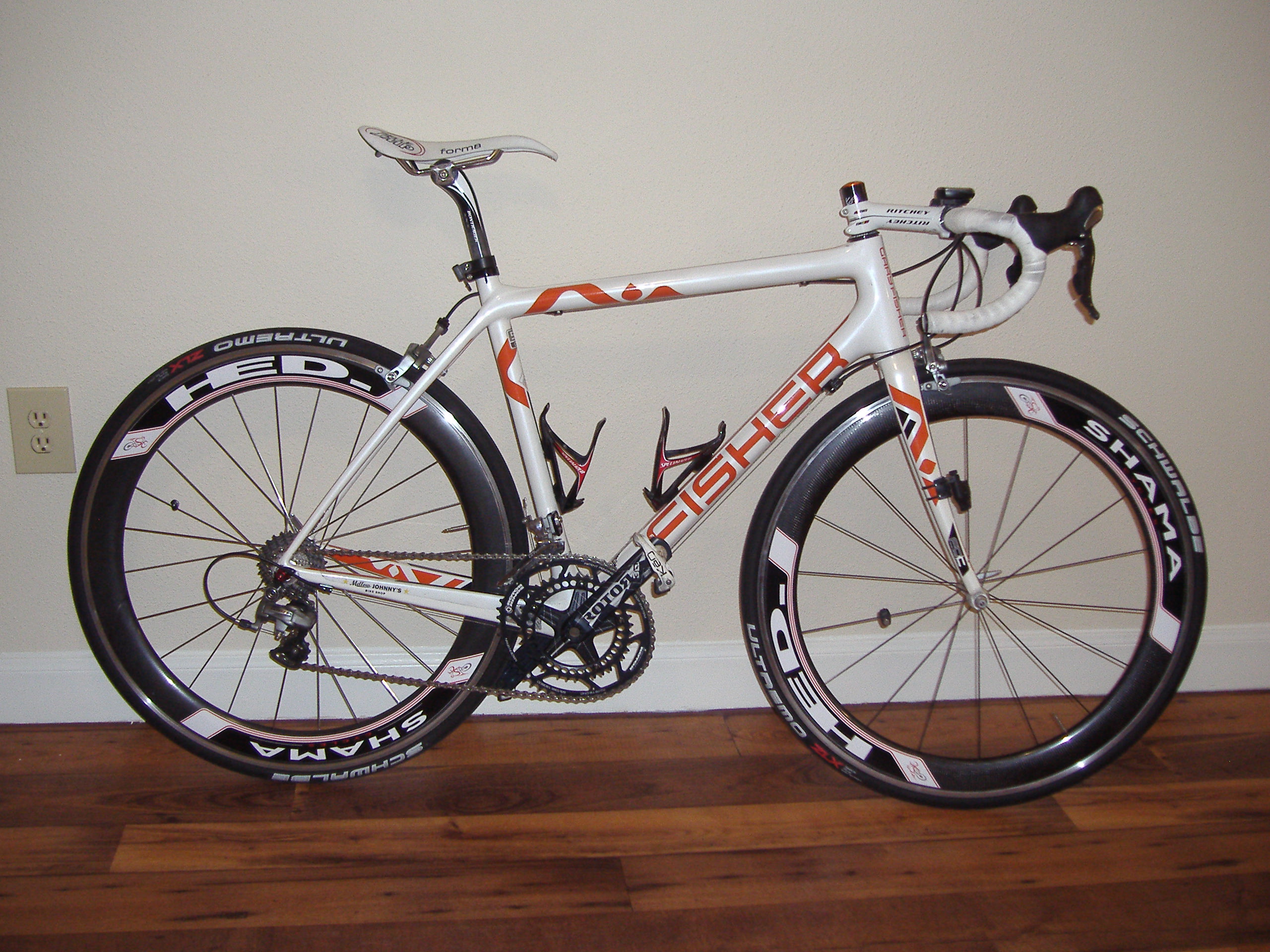
My Cronus Ultimate, equipped with HED Jet 6 clinchers

The deep rims help with the wind, but the type of rim – clinchers, tend to be heavy for racing so I felt concerned that they might hinder me on the rolling terrain at Cotton Patch. I tried out the wheels the day before the race and they felt fantastic – I was able to ride away from my usual group and I easily held a 25mph pace over them over the course of 8 miles or so into a headwind until I slowed down and waited for them to catch up. I got a good amount of sleep before the day of the race since my field started at 11:00 – but that meant that I would have to ride in the scorching 100+ degree heat at midday. When I arrived at the course, one of my Cat 5 teammates, Said Assali told me that he imploded in his race and advised me to conserve as much energy as possible and to not do too much work, if any at all. I agreed with his opinion, since that tactic helped me finish well on last year’s course.

After the start we quickly picked up the pace as the fist leg of the race went downhill, easily reaching speeds of 42 mph+. However, I thought we would slow down as the race settled down but unfortunately that didn’t happen – the race was very fast from the get go and the peloton showed no mercy – I had no chance for any breathers, or points in time at which I could relax, eat, drink, or think of a strategy for my teammates. Attacks frequently flew off the front and each time the group chased them down so they couldn’t get away. After 1.5 hours of hard racing the group put in another acceleration right before the feed zone and I got dropped. I checked my average speed which was 24 mph (I averaged 21.2 mph at last year’s race) on rolling terrain – the fastest I had ever put in over that interval of time over that type of terrain – faster than I had at Gonzales. I decided to finish the race to put in more training, but unfortunately I veered off course and got lost and spent about 30 minutes trying to find my way back and I ended up last out of the finishers. I did find out that 23 of the riders quit the race which made me feel slightly better about sticking it out. I think overall, the aerodynamic profile of the rims compensated for their weight. Bill Krause finished well for Shama – getting 11th.

I continued to train on my usual schedule and I felt pretty good for Cotton Patch coming up the week after in Greenville. I drove there after work and I only managed about 5 hours of sleep since I had to start at 8:10 AM the next day.

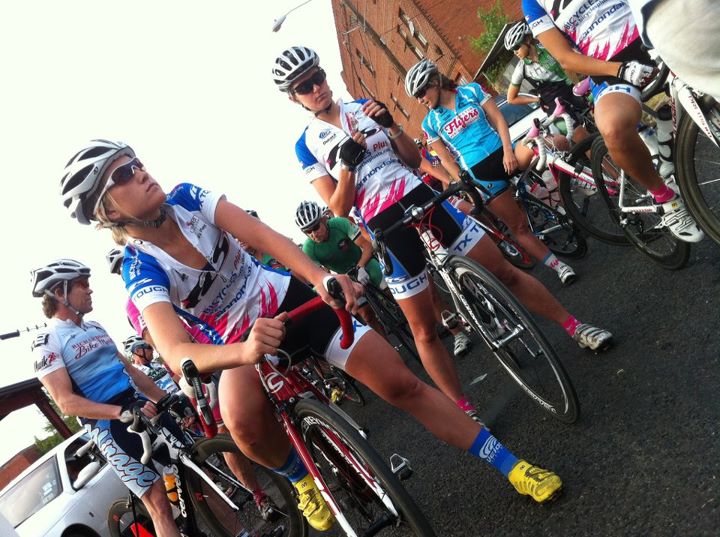
Staging for the women's race – photo taken by Team PACC

I talked to Bill at the beginning and he forgot to bring his kit to the race so he had to borrow some clothing from someone else. Anyway, the pace felt pretty easy at the beginning of the race – we had a strong tailwind and we could push 27-30 mph without too much effort. However, when the course moved into the wind attacks started to pick up and the pace was tough just like it was at Chappell Hill. I kept telling myself to stick it out for at least 2 hours but my legs gave in after 1 hour and it was no good. My last point of contact with the pack happened to be at an intersection when the lead motorcycle turned the wrong way and took all but 6-8 riders with it. I was with those 6-8 men and they decided to launch a fierce attack to take advantage of the mishap. I wasn’t able to stay with their acceleration and by the time the pack caught up with me they were all pissed that someone had the nerve to attack like that. However – when you’re racing you have to take advantage of every opportunity you get – though winning in this situation would not be the prettiest way to win a race. By this point the peloton had broken up in pieces and I got 2 guys to work with me to start sweeping up lone riders along the way. After about 10 minutes we saw some bodies sprawled out on the road and realized that there had been a crash in the chaos. As we continued the race, we picked up riders one by one and formed a group of about 10, taking turns doing work into the heavy headwind and crosswind. We eventually caught the Cat 5 group and passed them up. I felt good because this was a sign that I was making progress – last year I struggled in a lot of the Cat 5 races but this time, I was able to easily pass a field of 50 men racing against each other while I was in a smaller paceline of just 8 men (two other racers dropped off by that point). However, the paceline I was in were putting in a brutal effort – with about 14 miles to go, my legs gave up and I dropped back but finished the race, 33rd/45th, which was better than Chappell Hill. Afterward I learned the riders that I had dropped decided to pace themselves back by drafting off the Cat 5 racers – which is illegal and can result in disqualification. I was somewhat angry but since none of us were in contention anyway I let it slide. I checked the average speed before I got dropped which was about 23.7 mph – close to that of Chappell Hill – and much faster than I was riding last year. I’m getting stronger but perhaps the long term endurance isn’t there yet. Bill finished well in 15th place and I’ll probably end up helping him at Fort Hood next weekend – the last race of the season!

Posted in: Cycling, Logs

Post Navigation

« Previous 1 … 21 22 23 24 25 … 30 Next »

Archives

  • August 2025
  • July 2025
  • September 2023
  • February 2023
  • January 2023
  • October 2022
  • March 2022
  • February 2022
  • December 2021
  • July 2020
  • June 2020
  • May 2020
  • May 2019
  • April 2019
  • November 2018
  • September 2018
  • August 2018
  • December 2017
  • July 2017
  • March 2017
  • November 2016
  • December 2014
  • November 2014
  • October 2014
  • August 2014
  • July 2014
  • June 2014
  • February 2014
  • December 2013
  • October 2013
  • August 2013
  • July 2013
  • June 2013
  • March 2013
  • January 2013
  • November 2012
  • October 2012
  • September 2012
  • August 2012
  • July 2012
  • June 2012
  • May 2012
  • April 2012
  • March 2012
  • February 2012
  • January 2012
  • December 2011
  • September 2011
  • August 2011
  • July 2011
  • June 2011
  • January 2011
  • December 2010
  • October 2010
  • September 2010
  • August 2010
  • June 2010
  • May 2010
  • April 2010
  • March 2010
  • September 2009
  • August 2009
  • May 2009
  • December 2008

Categories

  • Actuarial
  • Cycling
  • FASLR
  • Logs
  • Mathematics
  • MIES
  • Music
  • Uncategorized

Links

Cyclingnews
Jason Lee
Knitted Together
Megan Turley
Shama Cycles
Shama Cycles Blog
South Central Collegiate Cycling Conference
Texas Bicycle Racing Association
Texbiker.net
Tiffany Chan
USA Cycling
VeloNews

Texas Cycling

Cameron Lindsay
Jacob Dodson
Ken Day
Texas Cycling
Texas Cycling Blog
Whitney Schultz
© Copyright 2026 - Gene Dan's Blog
Infinity Theme by DesignCoral / WordPress